Identify Every Service That Sends for the Domain
Before changing DNS, list the systems that send mail using your domain. Include the normal mailbox service, website contact form, transactional delivery provider, newsletters, billing software and any help desk. A website and its mailboxes can be hosted by different companies. Moving the website does not necessarily move the service that signs or sends email.
For each sender, note the visible From domain, the envelope sender used for bounces, the DKIM signing domain and the provider’s current setup instructions. This inventory is more useful than adding every suggested DNS value blindly. Removing an old include or replacing a signing selector without checking the sender can break mail that was previously working.
Keep DNS Inspection Separate from Message Authentication
A domain checker can retrieve published configuration. It can show that an SPF policy, a DKIM public key or a DMARC record exists at a particular name. That is a necessary diagnostic step, but it does not prove that an actual message used the correct sending IP, carried a valid signature or met alignment rules.
The Savvy Toolkit checker inspects the exact names entered. It does not send test email, read a mailbox, verify a message body, traverse every SPF dependency or claim inherited DMARC policy discovery. Treat each result according to that scope. A no-record response, a syntax warning and a DNS timeout describe different problems and should not all be reported as failed mail authentication.
Records and Message Authentication Are Different
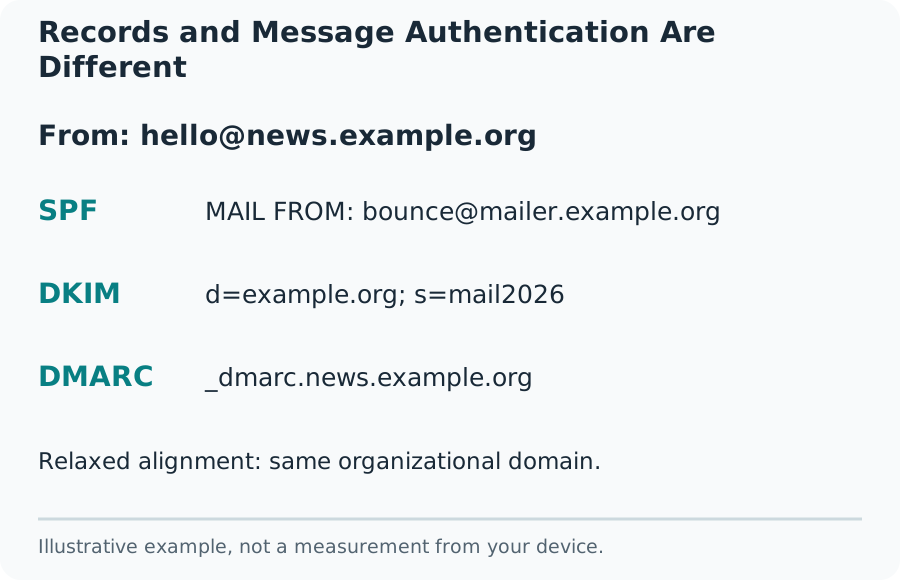
Publish One SPF Policy at the Correct Name
SPF declares which systems may send using a domain’s relevant envelope identity. Its TXT policy begins with v=spf1. Two separate SPF records at one DNS name cause a configuration problem; the solution is not to keep both and hope receivers choose the right one. Combine only the authorized mechanisms required by active senders, following their instructions.
A DNS interface may split one long TXT value into several quoted strings. Those strings form one record when concatenated and are not the same as two independent records. Also check the actual DNS name: an envelope subdomain can have a different policy from the visible From domain. Copying the apex policy into the wrong name will not repair that relationship.
Understand SPF Mechanisms and Processing Limits
An ip4 or ip6 mechanism authorizes an address range. include refers to another policy, while redirect delegates evaluation under its own rules. They are not interchangeable text shortcuts. The final all mechanism and its qualifier express the outcome for senders that did not match earlier terms; choose it according to the complete sender inventory.
Full evaluation is bounded. SPF limits DNS-querying terms to ten during a check, including nested dependencies. Counted terms include include, a, mx, ptr, exists and redirect, rather than every character or every IP range in the record. A simple count of visible include words is not a complete evaluation. Avoid flattening provider records into static IPs without a reliable update process.
Find the Real DKIM Selector
DKIM signatures identify a signing domain with d= and a selector with s=. The public key is normally found at selector._domainkey.signing-domain. Selectors are chosen by the sender and can change during rotation. A guessed value such as default returning no record does not prove that the domain is unsigned.
Read a legitimate received message or the provider’s configuration screen to find the active selector. Use the d= domain from that signature, which may differ from the visible sender. Some providers publish a CNAME that points to their managed key. Retain the requested name and any returned alias so a support report can distinguish delegation from missing data.
A practical selector mistake is pasting the complete lookup name into a field that expects only the selector. For mail2026._domainkey.example.com, the selector is mail2026 and the signing domain is example.com. Keep those values separate. Also compare the name shown by the tool with the provider’s expected DNS name before editing anything. A typo in the query can explain a missing answer without requiring any change to an otherwise working DNS zone.
A Public DKIM Key Is Not a Verified Signature
The DNS record publishes information needed to verify signatures. The sending system must still possess the private key and sign the relevant parts of the message correctly. Changes in transit can affect verification. Inspecting a readable key cannot establish that a particular body, subject or sender was authenticated.
An empty p= value can revoke a DKIM key. A key that once worked can also be replaced during rotation, so keep old selectors available for the provider’s recommended overlap period rather than deleting them immediately. Private signing keys belong in the sending system, never in a DNS TXT record, browser form or public support screenshot.
Read DMARC Policy Together with Alignment
DMARC links authentication to the domain visible in the message’s From field. A passing SPF result for an unrelated bounce domain is not enough by itself. Likewise, a valid DKIM signature for an unrelated signing domain is not automatically aligned. A message can pass DMARC through an aligned, passing SPF result or an aligned, passing DKIM signature.
The policy values none, quarantine and reject describe requested treatment of messages that fail DMARC. p=none is a monitoring choice and does not mean legitimate mail fails authentication. A stronger policy can disrupt valid senders that have not been configured correctly. Inventory senders and examine real results before changing enforcement. A receiver can also apply its own local handling.
Use the Current DMARC Specification
RFC 9989 supersedes the older core DMARC description in RFC 7489. Policy discovery now describes a bounded DNS Tree Walk rather than relying only on a public-suffix list. The current specification also introduces t for testing and removes pct from the core policy format. Older checkers and receiving systems may still interpret earlier records.
Do not copy an old gradual-rollout example without checking current provider guidance. This tool reports the exact _dmarc name queried; it does not claim to discover every inherited policy or calculate alignment from a domain alone. Aggregate reporting is described separately in RFC 9990. A reporting destination also needs proper authorization when it belongs to another domain.
Verify DNS Changes and Then Send Real Mail
Keep a copy of the previous values and change one part at a time. Check the authoritative DNS account and the record name, type and value before saving. A host field that automatically appends the zone can accidentally create a duplicated domain when a full name is pasted. The resulting value can look correct in the dashboard but be published at the wrong name.
After publication, compare public answers and allow for caching according to the old record’s lifetime. Then send a legitimate message from each active sending service to an account you control. Read the receiving system’s authentication results and compare the actual envelope domain, DKIM d= and s= values, and visible From domain. A DNS-only result cannot replace this step.
Diagnose Delivery Problems Without Promising an Inbox
SPF, DKIM and DMARC are parts of email delivery, not a complete ranking or reputation score. Receiving systems also consider sending behavior, complaints, message format, TLS, reverse DNS and local policies. Read the actual bounce code and the current receiving provider’s sender requirements before attributing every rejection to one TXT value.
For a useful correction report, include the domain, selector, queried DNS names, observed records, timestamps and a redacted authentication result from a message you control. Do not publish full mailbox contents or private keys. Fix the identified mismatch, verify each sender again and keep the scope of the conclusion narrow: the inspected records and tested messages behaved as recorded, not that all future mail is guaranteed to arrive.