How to Use This Tool
- Keep the full practice area visible.
- Start a round and click the active targets.
- Compare hits, misses and accuracy using unchanged settings.
Calculation Method
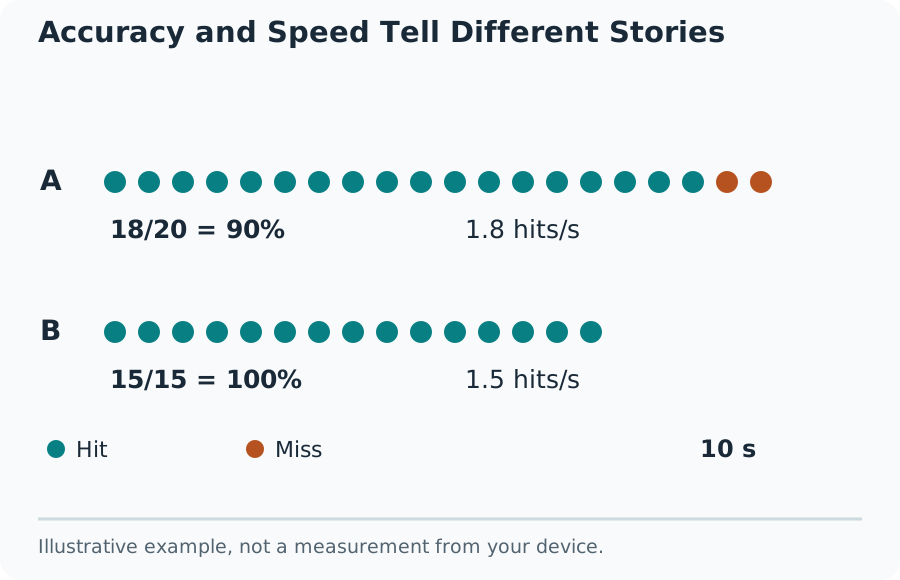
Accuracy is hits ÷ all scored attempts × 100. A session with 36 hits and 4 misses has 40 attempts and 90% accuracy. Forty hits with twenty misses is a lower-accuracy session despite the higher hit count. Use the visible duration when comparing target throughput; a longer round naturally permits more attempts.
Worked Example
Target acquisition includes seeing the new target, moving the pointer and activating the input. It is not an isolated reaction-time measurement. A small target near an edge can take longer than a large target beside the previous one. Random placement means two sessions are similar exercises, not identical laboratory trials.
Practice a Defined Mouse Task
This browser aim trainer presents targets inside a two-dimensional practice area. A hit requires the pointer to land inside the active target. A click elsewhere is a miss. The score describes that session on that layout; it is not a ranking against professional players or proof of improvement in a particular game.
Keep the whole practice area visible and use the same window size for repeat comparisons. Changing the area or target size changes the task. A touchscreen, trackpad and mouse produce different movement patterns, so record the input device as part of any personal comparison.
Accuracy and Speed Tell Different Stories
Build a Repeatable Practice Routine
Start at a pace that lets the pointer settle before each click. Complete one round without chasing a record. Repeat with the same settings and watch for overshooting, repeated corrections or hurried clicks. Change one setting at a time so an improvement has a clear explanation.
A useful note is brief: device, area size, target setting, duration, hits and misses. Compare several rounds rather than selecting the one fastest result. Scores from different aim trainers can use different target sizes, distances, penalties and scoring systems, so the headline numbers are not interchangeable.
Troubleshoot the Practice Area
Browser zoom, a resized window or a pointer leaving the area can affect the exercise. Stop and restart after a setup change. Background work, low-power modes and a busy browser can interrupt animation or event handling. A clean run cannot prove that all operating-system or game latency has disappeared.
What the Result Means
This tool does not reproduce game recoil, enemy movement, weapon spread or three-dimensional camera rotation. No browser score establishes an ideal mouse DPI or sensitivity. Use the sensitivity converter for a stated rotation model, then verify the result in the game's own practice area.
Common Questions
Is 100% Accuracy with Few Hits Better Than a Faster Round?
The numbers describe different trade-offs. Compare hits, misses and time to acquire each target together. A slower round can be more accurate without completing more successful target selections.
Which Presses Count as Misses?
A press on the empty practice-area background during a running round counts as a miss. Presses outside the practice area do not. Keep the same input device and layout when comparing rounds.