How to Use This Tool
- Enter the battery capacity in Wh from a documented rating or reading.
- Enter a representative average load in W, not the charger rating.
- Choose a usable-capacity percentage above zero and up to 100, then read the estimated hours.
Calculation Method
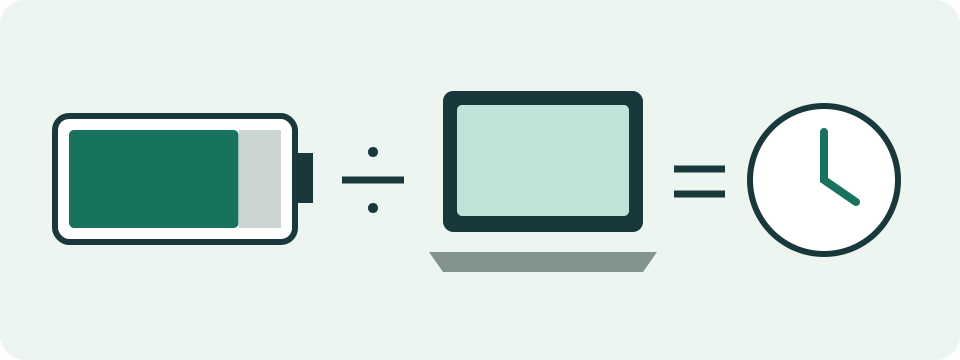
Usable energy = capacity Wh × usable percentage ÷ 100. Model runtime in hours = usable energy Wh ÷ average load W. The percentage represents your chosen available-energy assumption; no universal loss factor is inserted.
Worked Example
A 50 Wh battery with 80% usable energy provides 40 Wh in this model. At an average 5 W load, 40 ÷ 5 = 8 hours. These are illustrative inputs, not a device benchmark.
Choose the Energy Being Counted
The Wh input represents the capacity basis used for this estimate. A new battery's design rating, a current full-charge estimate and a remaining-energy reading are different amounts. Pick one and record its source. When using a current full-charge value, do not reduce it again for the same capacity decline. When using already-delivered usable energy, do not apply the same conversion loss twice.
A battery label or a clearly identified device report can supply energy information. Confirm its unit rather than guessing from the number's size or a field name. A confirmed 50000 mWh equals 50 Wh. A 5000 mAh charge rating is not 5 Wh. This page does not inspect the battery, upload a report or measure its stored energy. Unavailable capacity remains an unknown input, not a reason to use the example as your device specification.
Convert Charge Units Only with Matching Voltage
Wh and mAh describe different quantities. A documented charge rating can be converted outside this form using Wh = mAh ÷ 1000 × nominal battery voltage. Both figures must describe the same cell or pack and rating basis. A hypothetical 10000 mAh at a documented 3.7 V is 37 Wh. Do not multiply that charge figure by a separate 5 V USB-output label or guess voltage from the device category.
There is no voltage field or automatic mAh conversion here. Prefer a documented Wh value when available. Comparing two mAh labels without matching voltage does not establish equal energy. Likewise, a power station's advertised energy does not prove that its connector, inverter or battery can supply a particular load. Output and startup requirements need the manufacturer's separate specifications; the duration model checks none of them.
Use a Representative Average Load
Average W describes the rate of energy use for the session being planned. Match brightness, applications, peripherals, power mode and active or sleep periods to that session. A charger maximum, processor TDP or one instantaneous reading is not automatically the average battery demand. A longer observation under a comparable workload is more useful than a short reading taken during an unrelated task.
An observed 12 Wh used over two hours corresponds to 6 W on that energy-reporting basis. Equal two-hour periods at 4 W and 8 W also average 6 W. Unequal periods need a time-weighted average: sum each power × its duration, then divide by total time. Using that average in a future estimate assumes the workload pattern continues. The tool does not measure power or build the average for you.
Define the Usable Percentage Once
Enter 80 for 80%, not 0.8. The field selects a fraction of the entered energy with no hidden loss factor. Starting from a current full-charge basis, a chosen 70% to 20% window uses 50%, an approximate energy-window assumption. There are no separate charge or reserve controls. Combine the assumptions before entry and note what the percentage includes.
With 50 Wh design energy, an assumed 80% current capacity and a 60-percentage-point window combine as 0.80 × 0.60 = 0.48: enter 48%. Alternatively, use a corresponding 40 Wh full-charge value and 60%. Both select 24 Wh. Do not apply the capacity decline in both inputs. The initial 80% is an example, not universal efficiency, a health threshold or a recommended charge limit.
Read Usable Energy Before Duration
Usable Wh = entered Wh × usable percent ÷ 100. Hours = usable Wh ÷ average W. The default 50 Wh, 80% and 5 W selects 40 Wh and returns eight hours. At the same energy and fraction, 10 W returns four hours. The table compares explicit assumptions, not measured device benchmarks. More displayed digits do not make uncertain inputs more precise.
Fractional hours need conversion: 48 Wh divided by 20 W is 2.4 hours, or two hours 24 minutes. It is not two hours 40 minutes. The form displays a duration, but it does not promise the charge remaining at the end. Rate-dependent capacity, cutoff behavior, changing consumption and conversion losses can alter actual operation. A fixed fraction cannot independently predict each effect as load changes.
| Capacity Wh | Usable % | Average W | Selected Wh | Hours |
|---|---|---|---|---|
| 50 | 80 | 5 | 40 | 8 |
| 50 | 80 | 10 | 40 | 4 |
| 60 | 80 | 20 | 48 | 2.4 |
Investigate a Mismatch with Observed Runtime
First check Wh versus mWh or mAh, the percentage entry, capacity basis and whether the demand is representative. Match the measurement boundary: battery-side draw already includes relevant losses, while output-side demand may need a documented delivered-energy assumption. Do not deduct those losses twice. Repeat comparable observations before attributing a shorter run to a faulty battery; workload or reporting changes can produce the same discrepancy.
Positive energy, positive average power and a usable percentage above zero through 100 are required. Zero load does not produce an infinite-runtime claim. For declining reported capacity, the separate manual ratio tool checks comparable reported numbers without diagnosing a battery. For adding energy over a charge interval, use charging time with its own effective average-power assumption. Neither replaces a device's current operating or charging estimate.
What the Result Means
Actual load changes with brightness, applications and background work. Available energy also varies. Entered averages and allowances determine the result; it does not establish guaranteed runtime or diagnose a battery fault.
Common Questions
Can I Enter mAh as Wh?
No. mAh describes charge, while Wh describes energy. Use a documented Wh value. This version does not convert mAh using an assumed voltage.
Is Charger Wattage the Device Load?
No. A charger rating does not measure the device's average demand during battery operation. Use a representative documented or measured load.