How to Use This Tool
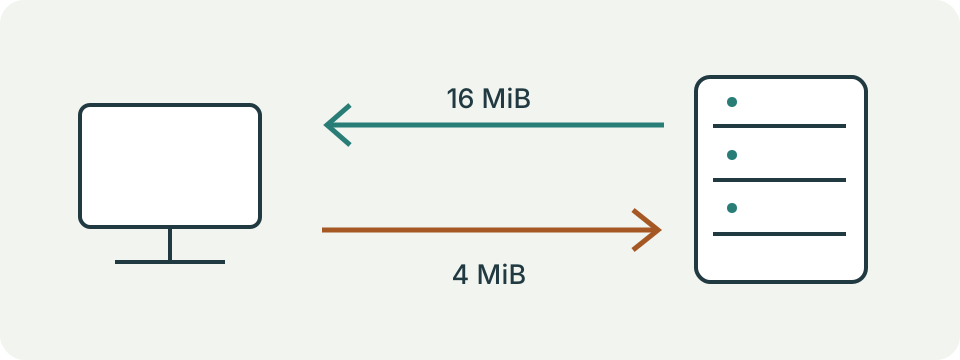
- Review the data allowance: up to 16 MiB of download payload and 4 MiB of upload payload per run, plus request and transport overhead.
- Keep this tab visible, pause other transfers and select Start. The upload uses generated test bytes, not a file from the device.
- Read each direction’s result only after all four of its transfers complete, with the aggregate bytes and measured duration. Stop cancels the active test; an incomplete direction has no speed result.
Calculation Method
The run uses four downloads of 4 MiB and four uploads of 1 MiB. Throughput in Mbps = completed payload bytes × 8 ÷ their measured transfer seconds ÷ 1,000,000. Each timing runs from starting the request through consuming and validating its response body; upload includes the server’s acknowledgement.
Worked Example
Receiving 16 MiB, or 16,777,216 bytes, in 2 seconds gives 67.11 Mbps. Sending 4 MiB in 1 second gives 33.55 Mbps. These are arithmetic examples, not measurements of this server.
Decide What Connection to Test
This test measures the route from the current browser to this site's endpoint. Record the device, Wi-Fi or Ethernet connection, VPN state and approximate time. A result obtained on mobile data describes that mobile path, not the home's broadband. The endpoint name appears during the run; the tool does not let you choose the nearest server or a game server.
Keep the original question specific. A slow file download, poor Wi-Fi in one room and a low rate to this server are related observations, but they are not interchangeable measurements. Compare the task's own performance alongside the test rather than expecting one number to identify the faulty component.

Review the Traffic Before Starting
Opening this page does not initiate the measurement transfers. Read the allowance, select the consent checkbox and start when the connection is available. A complete speed run performs twenty small HTTP timing requests, four downloads of 4 MiB each and four uploads of 1 MiB each. The main test payloads total 16 MiB down and 4 MiB up. Headers, acknowledgements and other protocol traffic add to that amount.
The upload consists of generated test bytes, not a document selected from the device. Those bytes reach this site's server. Connection metadata accompanies real network requests, so this is not an entirely local calculation. Repeated runs consume additional data; the displayed payload counters are not a provider's billing meter.
Keep the Run Comparable
Leave the page visible and keep the device in its original position. The test stops when the page becomes hidden. Pause an optional competing transfer through its normal controls before testing, and note that choice so another comparison uses similar conditions. Do not change connection type, VPN location and device together and then attribute the difference to one setting.
The sequence starts with HTTP timings, then receives download payloads and sends uploads. It uses bounded sequential transfers, not a sustained multi-connection attempt to saturate the line. A faster service using another server and method can legitimately produce a different number. Neither result automatically overrides the other.
Understand the Throughput Arithmetic
The download direction needs all four validated downloads before its speed is shown. Their payload bytes are added, their measured durations are added, and bytes times eight divided by total seconds gives bits per second. Dividing by one million gives Mbps. The upload direction follows the same aggregation, including the server's acknowledgement in its elapsed time.
An independent example of 16,777,216 received bytes in two seconds gives 67.108864 Mbps. A 4,194,304-byte upload completed in one second gives 33.554432 Mbps. They are arithmetic examples, not observations from this host. Do not average individual trial speeds without accounting for their durations; total bytes divided by total time is the method used here.
| Payload bytes | Elapsed seconds | Mbps |
|---|---|---|
| 16777216 | 2 | 67.108864 |
| 4194304 | 1 | 33.554432 |
Interpret Short Samples and Timing Summaries
An aggregate direction lasting less than one second receives a short-sample flag. It is a duration warning, not an adjustment that raises or lowers the speed. All tests remain sensitive to browser scheduling, server capacity, connection startup and the route. A fast short result does not certify the maximum capacity of a plan.
The timing rows describe completed HTTP round trips: minimum, maximum, mean, median and the mean absolute change between consecutive successful samples. Failed requests remain visible in the sample list. They are not replaced with zero milliseconds, and this page does not convert them into a measured UDP packet-loss percentage or one-way latency.
Handle Stops and Errors Honestly
Stop cancels the active test. A direction with fewer than four completed transfers has no aggregate speed result. A completed earlier direction can remain visible, while the unfinished one stays unmeasured. Download counts may include bytes received before a failure or stop. Upload counts include acknowledged payloads, although an unacknowledged attempt may still have used network data.
A timeout, unavailable endpoint or invalid response is a failed measurement. It is not a measured zero speed or proof that the entire Internet is down. The tool checks the response protocol, body size and unexpected compression before accepting a transfer. A hosting or proxy configuration problem can therefore prevent a result even when ordinary browsing works.
Use the Result for the Next Check
Repeat under the same conditions and compare a second destination through its own supported test when useful. A consistently slower Wi-Fi run than an Ethernet run suggests investigating the local wireless path, but it does not identify an exact channel or hardware fault. A slow result on both paths still leaves the server, route and other traffic as possibilities.
Use a representative measured upload rate to estimate a submission or backup, and a download rate for receiving files. The calculators do not turn this brief test into a guaranteed sustained rate. For calls or games, record interruptions and delay variation separately. Copy requests clipboard access and reports a failure when unavailable; printing uses the browser's normal print dialog.
What the Result Means
Server capacity, distance, Wi-Fi, browser activity and short test duration affect results. A failed request can reflect an unavailable endpoint, not a broken internet connection. Generated upload bytes reach this site’s server. Network requests expose ordinary connection metadata; this is not an entirely local test.
Common Questions
Why Does Another Speed Test Show a Different Result?
Its server, route, payload sizes and measurement method may differ. Compare repeated tests under consistent conditions.
Does This Test Measure the Speed of My Router’s Wi-Fi Link?
No. It measures an HTTP transfer through the complete path to this site’s test endpoint.