How to Use This Tool
- Look at the message locally and distinguish an outgoing bubble from an incoming one. Keep the color unknown when it is unclear.
- Select the visible iMessage, RCS, SMS or MMS label, not shown or unknown. Choose color only, not delivered, missing features or unknown as the symptom.
- Read the protocol explanation and relevant official checks. A color difference alone is not a delivery failure, and conflicting observations should be rechecked rather than forced into a protocol.
Calculation Method
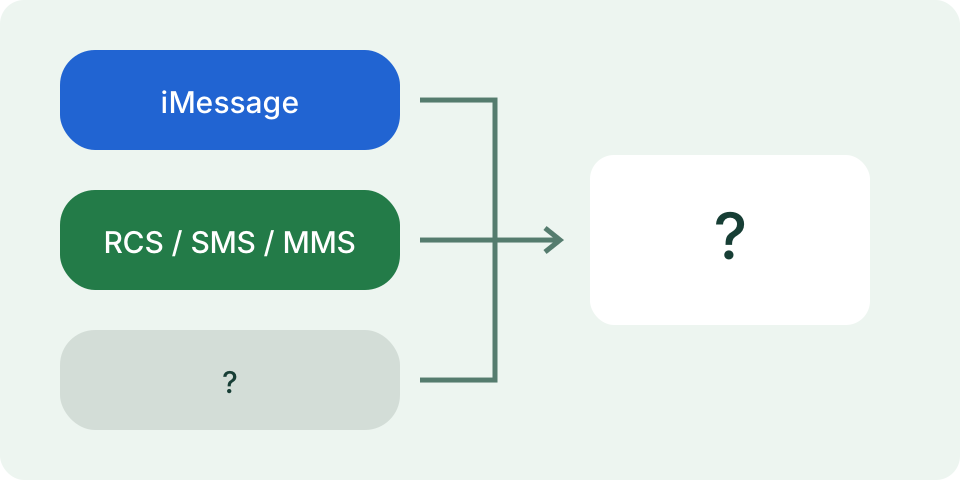
Apple documents blue outgoing messages as iMessage. Green outgoing messages can be RCS, SMS or MMS; green cannot distinguish them. An incoming gray bubble is not protocol proof. A visible service label adds context, while delivery status and available features require separate observations.
Worked Example
An outgoing green bubble with a visible RCS label fits Apple’s documented RCS appearance. It does not establish SMS use. A Not Delivered alert remains a separate issue even when the color is understood.
Read One Message in the Correct App
Use this guide for Apple's Messages app and identify the particular bubble you are checking. The fields ask for its color, a visible message-type label and the task that needs attention. Do not combine an older bubble with the current compose field, an adjacent message or a screenshot from another messaging app. A conversation can contain different sending methods over time. Record the individual observation rather than assigning one protocol to its entire history.
Keep a missing type label as not shown or unknown. The page cannot open Messages, examine screenshots, read a phone number or verify another person's settings. It does not send a test message. Changing a selection changes the displayed checklist, and the button announces headings. Reset clears those selections without changing Messages. Leave private text, contact names, phone numbers and account details outside the form; none are needed for this interpretation.
Distinguish Color from the Exact Transport
An outgoing blue bubble corresponds to iMessage in Apple's documented appearance. Outgoing green can represent RCS, SMS or MMS. Green alone therefore cannot identify which of those three carried the message. Use the available type information for that same observation and the current official support for the service. Gray in the incoming option does not supply a sending protocol. Keep it unresolved when no additional type information is available.
A switch from blue to green can have several explanations involving available services or settings. It does not establish that a contact blocked you, owns a particular phone or changed a setting deliberately. The guide's green branch asks for service-specific evidence instead of selecting SMS automatically. A missing or inconsistent label remains an observation to recheck, not something this browser can fill in from the color. No private conversation analysis or recipient identification happens here.
Keep Delivery and Feature Questions Separate
Choose the delivery symptom for an actual failed-send observation, such as the visible Not Delivered warning. The color-only task does not verify that a message reached another device. Record the warning and the connection used, then follow the official help for that message type. Deliberate retry and carrier fallback have different implications; a fallback may involve messaging charges. This page neither retries the message nor confirms a successful delivery afterwards.
Choose missing features for a specific expected behavior, such as an absent typing or read indicator. Check the real service, software, settings and carrier support before comparing it with another conversation. Absence of an indicator does not prove blocking, reading or a network failure. A feature supported by one protocol does not make it enabled for every participant. Keep the feature's own observation separate from both the bubble color and the delivery warning.
Recheck Contradictory Selections
Select outgoing blue with a visible SMS label. The checklist includes the iMessage color explanation and a conflict check. It does not invent a hybrid protocol or decide which input is correct. Confirm that both observations refer to the same item and the actual Messages app. A compose label can describe a forthcoming attempt, while an older bubble belongs to an earlier attempt. Record that difference rather than resolving it through a guessed cause.
Select outgoing green with an RCS label and missing features. The guide offers the green-service distinction, a feature check and an evidence record. It does not change the selection into SMS, guarantee that RCS features are active or inspect the carrier. Select gray incoming with no type shown and the result keeps protocol evidence open. These are independently reproducible checklist examples, not findings from a phone connection or a live messaging session.
Check Security and Settings Using Their Own Evidence
Color is not an encryption test. Apple's current documentation describes iMessage security and provider-dependent support for encrypted RCS, with security indicators for supported conversations. Do not label every green message encrypted or unencrypted. Check the visible security information and current requirements for the actual conversation. This guide has no encryption field, connection capture or account audit and cannot certify the protection of a message or any copy stored elsewhere.
For a new device or changed line, official troubleshooting can involve the active phone line and the intended send-and-receive identity. Check the current Apple instructions for the exact symptom and software instead of borrowing an old menu screenshot. Do not share verification codes or remove account settings simply to make a bubble blue. The desired outcome is the intended supported messaging task, with the observed result recorded, rather than a cosmetic color change presented as a repair.
Preserve Useful Observations for Support
Keep the app, outgoing or incoming direction, color, type label, exact warning and missing feature together. Add software and carrier details needed by official support without including private message text. Compare a relevant reversible setting deliberately and record the before-and-after result. A later successful attempt does not rewrite what an earlier bubble shows. It supplies a new observation, which matters when the symptom occurs only with one contact, line or service.
The guide always includes an evidence record. Unknown color adds observation, contradictory outgoing color and label adds rechecking, and delivery or feature symptoms add their own groups. It does not test Apple's service availability. The connection-path guide can help record the connection used for a retry, while the phone-sound checker is relevant only when the actual task is an absent ringtone or media sound. Neither proves message delivery, blocking or the recipient's configuration.
What the Result Means
This page cannot inspect Messages, verify a recipient’s settings or send a test message. Features depend on the actual service, carrier support, software and settings. Color does not prove delivery, blocking or encryption. Use the visible protocol and security indicators with current Apple guidance; private details stay outside the form.
Common Questions
Does Green Mean the Message Used SMS?
Not necessarily. RCS, SMS and MMS can all appear green on iPhone.
Does a Gray Incoming Bubble Identify iMessage?
No. Incoming color alone does not establish the service. Check the visible conversation context and service label.