How to Use This Tool
- Identify what the existing readings cover: a core rail, package feed or EPS input.
- Enter DC volts and amps measured at that same boundary and operating state.
- Enter duration in hours and review watts and constant-load kWh.
Calculation Method
DC power equals volts multiplied by amps. For a constant equivalent load, energy in kWh equals watts multiplied by hours divided by 1,000. This arithmetic does not identify a processor, predict its workload or infer power from frequency.
Worked Example
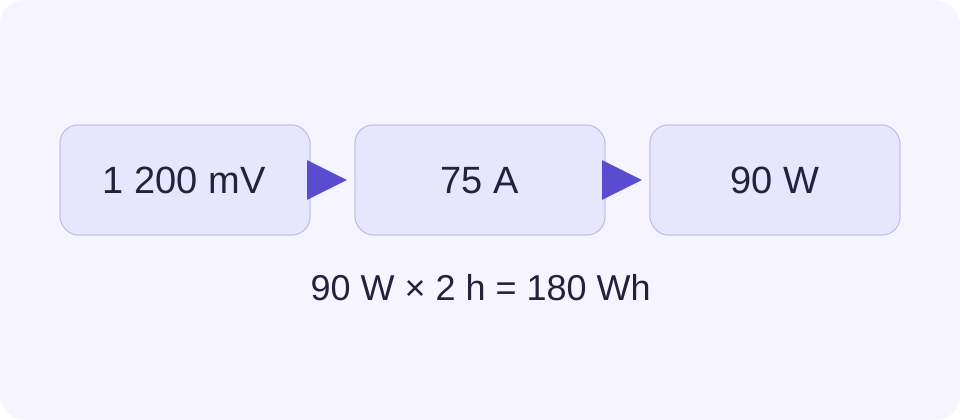
Matching readings of 1.2 V and 75 A give 90 W at that boundary. A constant equivalent 90 W load for two hours uses 0.18 kWh. This is an arithmetic example, not a recommended CPU voltage or a measurement of your hardware.
Identify the Boundary Before Entering Numbers
A CPU can receive power through several supply rails. A core rail, a complete package reading and a motherboard EPS input describe different parts of that path. The calculator returns power only for the voltage and current pair entered. It cannot turn a partial rail reading into the total processor consumption.
Use existing readings from a documented monitoring or measurement source. Keep the labels, units and operating state with the result. A core voltage shown by one program and an input current shown elsewhere are not a valid pair merely because both relate to the CPU. No hardware measurement is performed by this page.
Match the Time as Well as the Rail
For steady DC readings, multiplying volts by amps gives watts. For a changing workload, voltage and current should describe the same moment or a properly calculated equivalent interval. Multiplying two unrelated averages may differ from averaging the matched power samples.
For example, equal-duration samples of 1.0 V at 10 A and 1.4 V at 20 A have powers of 10 W and 28 W. Their average power is 19 W. Multiplying average voltage, 1.2 V, by average current, 15 A, gives 18 W instead. Use a logged power average or matched sample calculations when variation matters.
Use Hours Only for the Stated Load
The energy output assumes the entered wattage remains an equivalent constant load over the full duration. A two-hour game session with a changing CPU workload is not described by its highest one-second reading. Use representative average power for that interval, or calculate separate periods and add their energy.
The output covers the selected DC boundary. It excludes other components and any upstream conversion loss not represented there. A utility meter measures a wider AC input boundary, so multiplying the CPU result by the electricity rate would not reproduce the total computer bill.
Do Not Substitute TDP or Guess from Clock Speed
Base power, thermal design power and turbo limits describe manufacturer-defined operating or design conditions. They do not provide the missing current for this calculation. Two workloads on the same processor can produce different readings, and a browser cannot identify that difference from the model name.
Use this result to audit an existing pair of readings, not to choose a voltage, validate an overclock or certify cooling. For PSU capacity planning, gather the CPU’s documented maximum requirement and the other component allowances in the separate PSU calculator. That task needs a whole-build view.
What the Result Means
The browser cannot measure CPU rail current or certify whole-package power. Pairing a 12 V EPS current with a core voltage gives an invalid result. Different rails, time samples, regulator losses and the rest of the computer are not automatically included.
Common Questions
Can I Enter TDP Instead of Amps?
No. TDP or base power is a manufacturer design figure in watts, not a measured current in amps. This calculator requires matching voltage and current readings.
Why Does Monitoring Software Show a Different Watt Value?
Its value may cover another boundary or sampling period. Package power, core-rail output and EPS input can differ. Compare labels and timestamps before comparing numbers.