How to Use This Tool
- Add each attachment size with its unit, or select local files. Keep files separate: padding and line breaks are calculated per attachment. The limit is 100 entries.
- Enter an allowance for the message body, headers and MIME boundaries, then the applicable message limit and unit. Check the actual account, client and recipient rules.
- Calculate and compare the raw total, encoded attachment total and modeled message total. A size comparison is not confirmation that a provider will accept or deliver it.
Calculation Method
Each file is converted to whole bytes, rounding upward where needed. Base64 length is 4×ceil(bytes/3). The model wraps at 76 characters and adds two CRLF bytes after every nonempty line, including the last. Encoded attachments plus the entered overhead form the modeled message. This is one stated wrapping convention, not a provider’s exact wire format.
Worked Example
A 1 MiB file has 1,048,576 bytes. This model produces 1,398,104 Base64 characters and 1,434,898 bytes after line breaks, before the separate message overhead. Adding 2,000 bytes of overhead gives 1,436,898 modeled bytes.
Count Each Attachment Once
Enter one raw file size per line, or select local files to read their byte sizes. The calculator combines both lists, so a file selected and entered manually is counted twice. The selection reads File.size; it does not upload the contents or send an email. Clear selected files removes that part of the list while preserving manual entries. Reset clears the complete estimate, including the limit and allowance for other message data.
Choose bytes, decimal MB or binary MiB for manual sizes. One MB is 1,000,000 bytes; one MiB is 1,048,576 bytes. The file chooser already supplies bytes regardless of the manual selector. A display rounded to 18 MB may conceal enough bytes to change a close result. Use the exact byte property when available. Up to 100 attachments can be combined, and a zero-byte attachment is accepted; it still needs any relevant message-part headers in the separate allowance.
Enter a Whole-Message Limit Deliberately
The limit field represents the total message budget you want to test, in its own selected unit. It is not a provider selector and does not fetch account rules. An attachment allowance published by a service may describe raw files, while a mail server can impose a total encoded-message limit. Those figures are not interchangeable. Establish what the applicable sending and receiving rules actually count before using a headline number as this field's value.
Enter the bytes allowed for the message body, headers, MIME boundaries and other unmodelled data in the overhead field. Zero means none of that data has been budgeted, not that real mail has no overhead. A fractional byte allowance is rejected. The calculator rounds manual file sizes upward to bytes and the limit downward. It also rejects negative sizes, an empty attachment list, a nonpositive limit and counts outside the safe integer range. A missing result calls for corrected inputs, not an assumption that the files fit.
Follow the per-File Encoding Arithmetic
For each file of n bytes, the model uses 4 × ceil(n / 3) Base64 characters. It then allows two bytes for each line of up to 76 characters, including the final line in this planning model. The ceiling function means rounding upward to the next whole number. This per-part line allowance is explicit: the result is not a byte-for-byte serialization of every mail client or encoding choice.
A 57-byte file produces 76 characters and two line-ending bytes, giving 78 bytes. A 58-byte file produces 80 characters across two modeled lines, giving 84 bytes. The extra raw byte crosses both an encoding-group and line boundary. Multiplying every file by 1.33 would miss these small-file details. Several attachments are encoded separately, so grouping them only after adding their raw sizes can also give a different answer.
| Raw bytes | Base64 characters | Modeled encoded bytes |
|---|---|---|
| 57 | 76 | 78 |
| 58 | 80 | 84 |
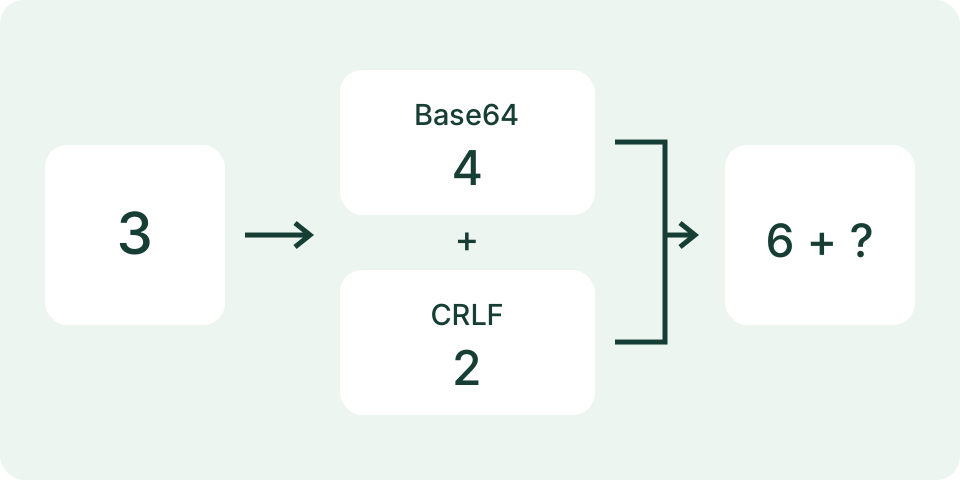
| 1 + 2 | 4 + 4 | 6 + 6 = 12 |
Check an Independent Two-File Example
Take two files of 1 and 2 bytes, with an overhead allowance of 100 bytes and a total limit of 112 bytes. Each file produces four Base64 characters plus two modeled line-ending bytes. Raw total is 3 bytes, encoded attachments total 12 bytes, and message total 112 bytes. Remaining budget is zero, so the estimate is within the entered limit at equality. That label does not certify that a provider will accept the email.
A single 3-byte file would produce four characters plus two modeled line-ending bytes, or 6 bytes before overhead. It is a different attachment layout despite the same raw total. Combining files in an archive can change both layout and actual raw size, but this tool does not create an archive or predict compression. Measure the archive itself before estimating its message size; do not continue using the sizes of its original contents.
Use the Result to Choose the Next Step
Raw total describes the selected and entered files. Encoded total adds the modeled Base64 and line endings. Message total adds your allowance, while remaining budget subtracts that estimate from the entered limit. A negative remainder describes the amount over that budget. Recheck the units and duplicate entries before reducing a document or discarding needed material. A larger allowance may turn a borderline fit into an over-limit estimate without changing any file.
This calculation does not check blocked file types, recipient quotas, security filters, link permissions or successful delivery. A file-sharing link is a separate workflow with its own access and expiry settings. Test the recipient's access through the intended account and preserve the required original file. A video file-size estimate can help plan a new export, but the final exported file should be measured here rather than treated as identical to an approximate bitrate calculation.
What the Result Means
Published limits can describe raw attachments, the whole message or cloud links. Gmail personal attachments and Outlook.com file attachments are documented as 25 MB, checked 7 October 2026; Outlook client guidance separately describes a 20 MB total email limit for internet accounts. Those labels are not verified byte-exact thresholds. Workspace/admin settings, recipient limits and blocked file types still apply.
Common Questions
Should I Enter Gmail’s 25 MB as an Encoded-Message Guarantee?
No. Its help describes an attachment limit; larger totals can become Google Drive links. Enter the limit applicable to the comparison, with its stated meaning.
Does Selecting a File Upload It?
No. This tool uses local File.size metadata only. The estimate does not compose, encode or send the actual file.