Define the Job Being Priced
Name the part, material, printer and quantity before collecting numbers. A cost estimate for one finished item is different from a whole build plate, a prototype with several failed versions or a batch that shares preparation work. Decide which of those the total should describe. Keep all costs in one currency and write down what is included. That makes a later comparison meaningful: a cheaper total that excludes labour cannot be compared directly with a total that pays for preparation and finishing. The calculator adds the supplied amounts; it cannot decide the business scope for you.
Slice with the Intended Settings
Open the model in the slicer and select the printer, nozzle, material and print settings that will actually be used. Copy estimated filament mass and duration after generating the toolpath. A downloaded model does not have one universal print weight or time. Infill, layer height, walls, supports and orientation can change both. Save the profile or record its relevant settings beside the estimate. This calculator does not inspect an STL and infer an exact job. Its inputs should come from a prepared job rather than the outside dimensions of an object.
Account for Consumed Filament
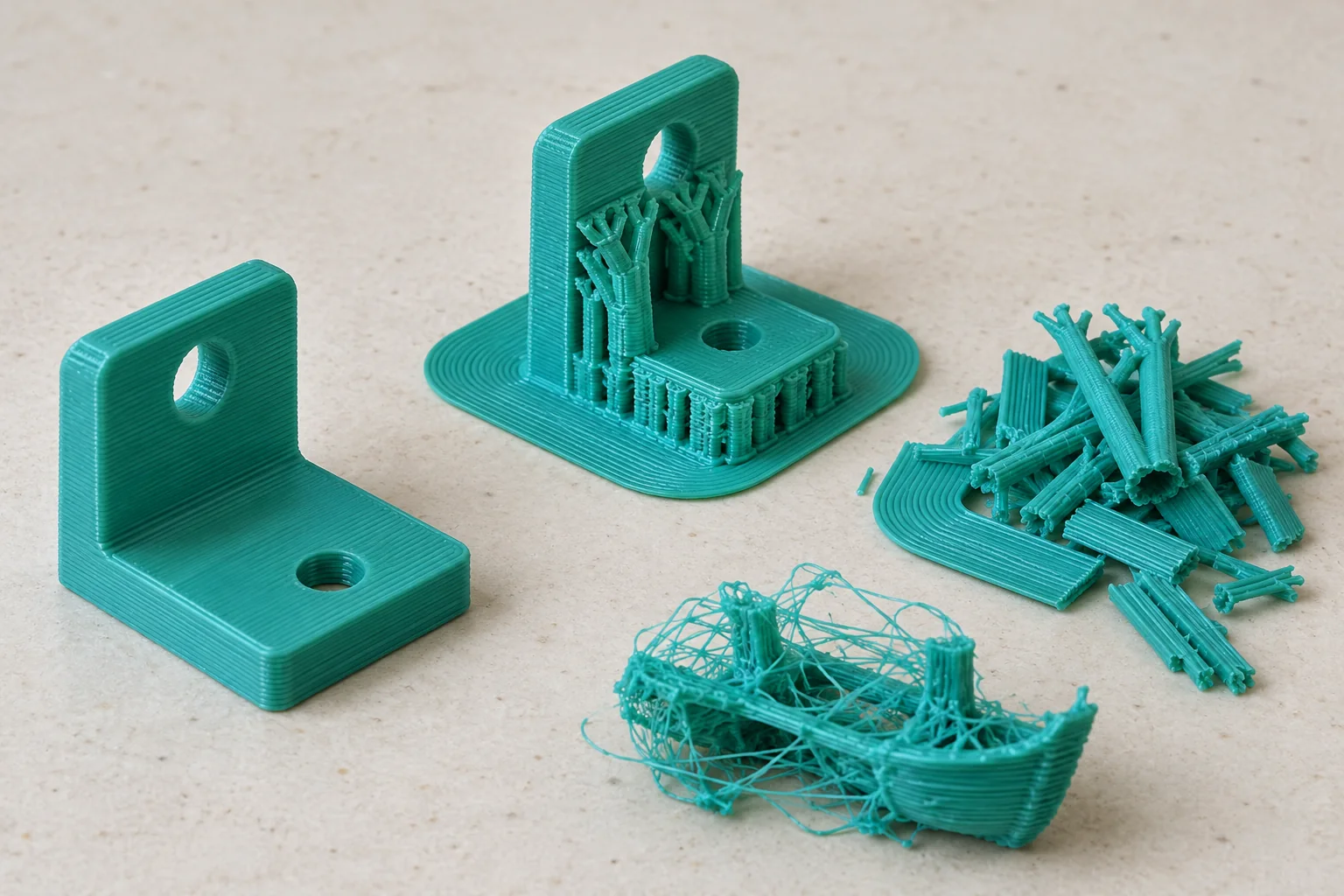
Use the filament consumed by the job, including supports, brim and purge material that the slicer includes. The finished object can weigh less because some material is removed or discarded. Do not add the same support allowance again when it is already present in the copied total. For a partly used spool, base the kilogram price on a consistent purchase record. Discounts, delivery charges or tax can be included in material cost according to your chosen accounting scope, but keep that choice consistent between jobs. State an assumption when the exact purchase cost is unavailable.
The Finished Part Is Not All the Material Used
Convert Grams to Material Cost
Material cost equals grams divided by 1,000, multiplied by the price per kilogram. For example, 80 g from a spool costing 25.00 per kilogram uses 0.08 × 25.00 = 2.00 in material. A price per 750 g spool must first be converted to the same basis: a 22.50 spool of 750 g is 30.00 per kilogram. Entering 22.50 as a kilogram price would understate that material. Keep units visible beside the number and retain calculation precision until the final currency total is rounded.
Use Average Power Rather Than the Label
The wattage printed on a power supply describes a rating, not a complete print’s average draw. A machine can use different amounts while heating, moving, holding temperature and cooling. A suitable energy meter can provide the energy used over a representative completed job. Divide measured kWh by job hours to obtain average kW, then multiply by 1,000 for average watts. Treat an assumed wattage as an assumption. Do not turn another owner’s reading, a marketing specification or a single heating peak into a claimed measurement of your printer.
Calculate Electricity in kWh
Electricity cost equals average watts divided by 1,000, multiplied by hours and the price per kWh. A four-hour job averaging 120 W uses 0.48 kWh. At 0.30 per kWh, its energy cost is 0.144 in the chosen currency. That is about 0.14 when displayed to two decimal places, not 14.40. Check that a bill’s cents or pence have been converted to the currency unit entered in the calculator. Fixed electricity charges require a separate allocation decision rather than being disguised as a larger measured energy use.
Compare Estimated and Elapsed Time
Slicer time can differ from elapsed machine time because of acceleration limits, startup routines, calibration and firmware behaviour. Record both values for a few representative jobs rather than assuming one universal correction factor. Decide whether your machine-hour rate covers only printing or the whole occupied period. A printer cannot take the next job while it remains occupied by a process you chose to include. Updating the duration should update energy and machine-time costs together, while hands-on labour changes only when someone actually spends additional working time on the job.
Build a Transparent Machine Rate
A machine hourly allowance can distribute purchase cost, maintenance and other chosen ownership expenses across expected useful printing hours. For example, allocating 500.00 over 1,000 hours contributes 0.50 per hour before any separately included maintenance. These are planning assumptions, not a promise that the machine will last exactly that long. State the hours and expenses used. Avoid charging a separate repair allowance when the same repairs are already inside the hourly rate. Revisit the rate as actual usage and maintenance records become available instead of treating the initial estimate as a permanent fact.
Count Hands-on Labour Separately
Preparation, file checks, plate handling, support removal, finishing and packing can take active working time. Enter that time separately from unattended printing. Fifteen minutes at 12.00 per hour costs 0.25 × 12.00 = 3.00. Charging all four print hours at the same labour rate would describe four hours of paid work, which may not match the process. For batches, separate work that happens once from work repeated for every part. A brief time record provides better evidence than a fixed labour percentage attached to every model.
Check the Full Worked Example
Combine the earlier 80 g material example with four print hours at 120 W, energy priced at 0.30 per kWh, machine time at 0.50 per hour and fifteen minutes of labour at 12.00 per hour. Material is 2.00, electricity 0.144, machine allocation 2.00 and labour 3.00. The sum is 7.144, displayed as 7.14 with two decimal places. None of those rates is a recommendation for your printer or market. They form an independently reproducible example that checks units and addition before you replace every assumption with your own figures.
Handle Waste and Failed Attempts Honestly
Supports and purge can be known material for a prepared job. Failed attempts are a different uncertainty: some fail early, some near completion, and some also require new preparation. Keep records of how much time and material were actually lost. A percentage allowance can represent a planning choice, but it should not be presented as a measured failure probability without records. Do not count full replacement cost twice by inflating weight and then adding the same failure allowance to the total. State the chosen basis whenever a quote includes expected rework.
Separate Cost from a Selling Price
The calculated cost is not a market price and does not prove that a customer will buy the item. Packaging, delivery, platform charges, tax treatment and desired profit may require additional lines outside the chosen cost model. Markup and margin also use different denominators: adding 25% to a cost of 8.00 produces a price of 10.00 and a margin of 20% of that sale price. Do not label the 25% markup as a 25% margin. Check the assumptions before using a calculator total in a customer-facing quotation.
Compare Changes One at a Time
Make a copy of the baseline assumptions before trying a different orientation, material or print speed. Change one variable and inspect which cost lines move. Faster printing can reduce machine time but might also change quality or failure experience, which a simple cost calculation cannot predict. A heavier support structure can increase material while making a job more reliable. Keep those trade-offs in a note beside the price rather than pretending that the lowest computed cost automatically produces an acceptable part. The useful result is an explainable comparison for the same intended finished object.
Keep Scope and Records Clear
This guide describes FDM filament jobs. Resin printing has additional material, washing, curing, handling and equipment considerations that cannot be assumed equivalent. A zero value in a field omits that cost, rather than proving that the real expense is zero. Keep the initial estimate, actual material use, elapsed time and any rework together. The next estimate can then use a more representative input instead of another invented default. A calculator is most useful when it preserves the difference between what was measured, what came from a slicer and what remains a planning assumption.