Choose What You Want to Count
Start by listening to the section you want to use. Nod or tap to a pulse that continues through the phrase, including spaces between notes. A busy drum part may contain several sounds within each beat. Counting every one of those sounds gives a subdivision rate, which can be twice or four times the underlying pulse. The aim is to choose a useful counting unit, not merely the largest number a detector can display. Write down the section and your choice so a later comparison uses the same musical task.
Choose a Representative Audio File
A local recording with a clear rhythm is a better starting point than an opening made of speech, silence or free timing. Use a file you are entitled to handle and keep its original copy. The BPM Finder decodes supported audio in the browser rather than requiring the recording to be sent to a tempo-analysis server. Browser codec support still matters. An MP3, WAV or other extension names a container or format family, but does not guarantee that every encoding can be decoded on every device. A reading failure is a compatibility result, not an analysis of the music.
Treat Automatic Detection as a Proposal
An automatic estimate looks for repeated rhythmic activity in the signal. The strongest regular activity may come from the snare, hi-hats, bass, or another repeating sound, and it may not match the beat you chose. A sparse introduction and a dense chorus can therefore suggest different numbers without either passage being a different song. Listen to the result against a longer phrase. This finder does not identify key, name the recording or promise an accurate beat grid for editing. Its value is a useful tempo candidate that can be checked, not a substitute for musical judgement.
Beat Spacing Gives a Tempo Candidate
Check Half and Double Tempo
A result near 140 BPM and a result near 70 BPM can describe the same pattern at different counting levels. At 140 BPM each click is about 0.429 seconds apart; at 70 BPM it is about 0.857 seconds. Counting two smaller pulses for each larger pulse connects those interpretations. Do not decide solely from a preferred tempo range for a genre. Count through the phrase and listen to where the main accents fall. Choose the pulse that supports the task, then note the chosen interpretation when passing the number to someone else.
Use Tap Tempo Independently
Tap a steady pulse for several bars without watching each new estimate. Use one tap per chosen beat. Watching the changing value can tempt you to correct your movements around the display rather than follow the recording. After the attempt, restart and repeat the same section. Several close results are more useful than one number after a few irregular taps. Tap tempo measures your input timing, so hesitation, a missed beat or a double tap affects the estimate. It does not hear the song playing in another application or certify the recording’s tempo.
Verify the Number with Time
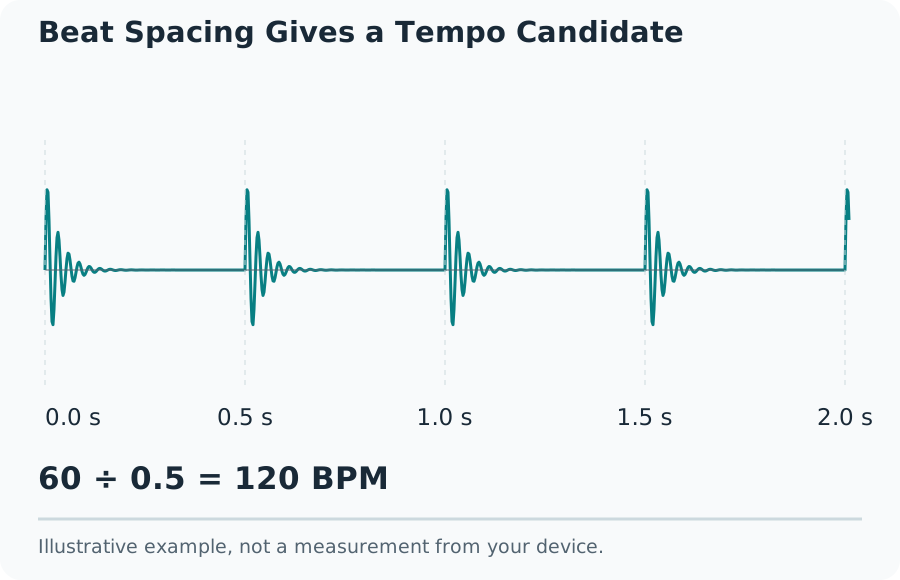
The basic relationship is BPM = 60 divided by the seconds between beats. A regular 0.5-second interval gives 120 BPM; 0.75 seconds gives 80 BPM. For a longer manual check, count intervals rather than confusing beats with gaps. Eleven beat positions contain ten intervals. A ten-interval span lasting 5 seconds gives 10 × 60 ÷ 5 = 120 BPM. This arithmetic is useful for checking a regular click track or a marked excerpt. It does not remove uncertainty about where a musical beat starts in a complex performance.
Set Up the Metronome
Enter the proposed BPM and choose how many clicks form a bar. The accent helps identify the first click of that group; it does not change the distance between clicks. At 120 BPM, a four-click bar lasts 2 seconds. A three-click bar at 90 BPM also lasts 2 seconds, even though its pulse rate differs. The control describes grouping, not every rule of musical notation. A compound-meter exercise may count smaller subdivisions or larger dotted-note pulses. State the counting unit when comparing a metronome setting with a score or another musician’s notes.
Check for Drift Across a Phrase
Start the click near a clear beat and listen through several phrases. A fixed offset can come from where playback began or from output latency. A gap that grows progressively suggests a tempo mismatch or a performance that changes speed. Restarting at every bar can hide that drift, so let a meaningful passage run. Do not assume that an older recording or live performance must fit a fixed digital grid. A single BPM can summarise part of it while failing to describe the timing of the whole performance.
Make a Small Practice Task
Select a short passage and a speed that allows consistent notes and movements. Count one bar before beginning, keep the count through rests, then repeat the same section. Record the chosen BPM, the passage and what counted as a clean attempt. Raise the tempo in modest steps between attempts after the passage is stable. A higher BPM with different fingering, skipped notes or a shorter phrase is not the same test. Keep the task consistent so the record describes progress rather than a succession of unrelated numbers.
Understand What the Screen Cannot Measure
The browser schedules audio, but the audible click travels through software buffers, an audio device and possibly a wireless link. That route can delay the sound relative to the visual beat indicator. A visual flash and a speaker click therefore should not be treated as a calibrated latency instrument. Keep the page active and avoid comparing results across heavily loaded and idle sessions without noting the change. For alignment-sensitive checks, a wired output removes one variable. It still does not turn the browser into a measurement of the sound at your ear.
Keep Pitch and Tempo Separate
A tone generator controls frequency in hertz; a metronome controls a repeated beat in BPM. A 440 Hz sine wave oscillates 440 times each second, while 120 BPM means two chosen beats per second. Those are different tasks despite both involving time. The tone generator can provide a brief reference signal, but it does not find the tempo of a song or listen for tuning errors. Start any generated sound at low device volume and stop between checks. Its digital level is not a calibrated acoustic pressure reading.
Handle Difficult Recordings
Use another stable section when a clip is dominated by silence, rubato, changing tempos or weak percussion. A sustained note can have a clear pitch without a clear beat. A swung pattern can change subdivision spacing while preserving the main tempo. An estimate that jumps between attempts deserves more listening rather than an invented certainty label. Keep the proposed value, your manual alternative and the section used in the same note. For a precise edit, check the actual beat positions in suitable audio software instead of forcing every event onto one guessed grid.
Keep a Useful Comparison Record
Save the recording name privately, section timing, detector result, half-or-double choice, tap attempts and metronome setting. Add the device and audio route when timing comparisons matter. This small record explains why two people may choose different numbers and lets a later session repeat the task. It also separates an estimate from a verified listening decision. No account, popularity claim or impressive-looking precision makes an uncertain musical pulse exact. A result is ready to use when its interpretation is clear and it stays useful through the passage you actually intend to practise.