How to Use This Tool
- Lower the device volume and select a frequency.
- Choose sine, square, triangle or sawtooth.
- Start briefly, adjust cautiously and stop when finished.
Calculation Method
Frequency describes cycles per second. A 440 Hz setting asks the browser to generate 440 waveform cycles each second; it does not set the loudness at your ear. Start with a modest frequency and a low device volume. Do not raise the volume to compensate for a tone that is difficult to hear.
Worked Example
A 1,000 Hz tone completes a cycle in 1 millisecond because period = 1 ÷ frequency. At 250 Hz, the period is 4 milliseconds. Doubling frequency halves the period. These relationships concern the generated signal; they do not prove that a speaker reproduces every part of that signal at the intended level.
Choose a Waveform for the Task
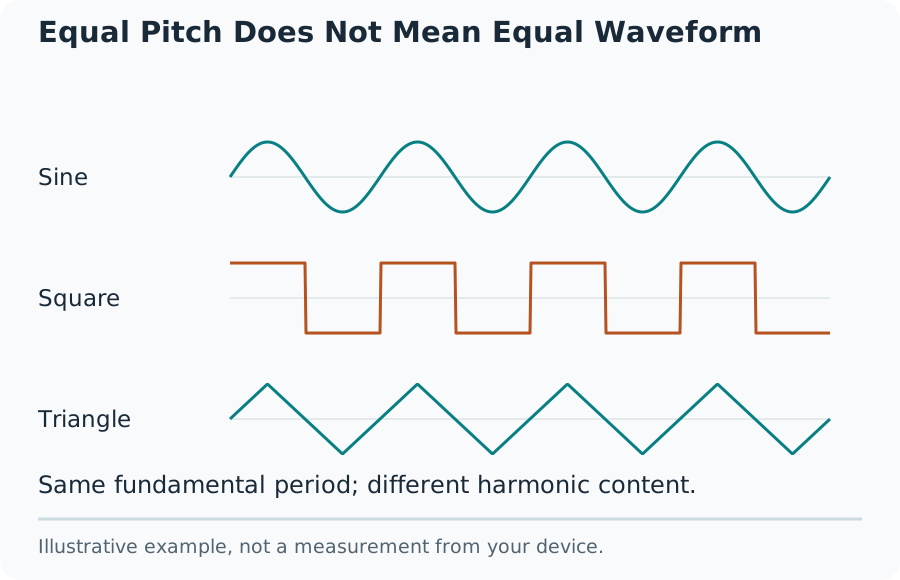
A sine wave contains one frequency in its ideal mathematical form. Square, triangle and sawtooth waves contain additional harmonics and sound different at the same fundamental frequency. Choose sine for a simple reference. Changing waveform can change perceived loudness and equipment behaviour even when the on-screen level stays unchanged.
Equal Pitch Does Not Mean Equal Waveform
Read Period and Frequency Together
Digital audio also has a sample rate. That rate is a separate quantity from the tone frequency. Browser and device processing limit which frequencies can be reproduced usefully. Very high settings can be filtered, distorted or inaudible, so the number in the control is not a measured acoustic output.
Use a Reference Tone Sensibly
A brief tone can help confirm that the selected playback path produces sound. Keep the test short, stop between comparisons, and note the device and settings used. For checking left and right output, use the dedicated speaker test rather than treating a single continuous tone as a complete channel diagnosis.
For matching a musical reference, confirm the intended pitch standard first. The common A reference is not a rule for every instrument or recording. This page generates a selected signal; it does not listen to an instrument, display a tuning error, or automatically calibrate your output.
Troubleshoot No Sound
Check tab mute, the system output device, headphone connections and application volume. A browser can require an explicit Start action to enable audio. Change one part of the playback path at a time. No sound at one high or low frequency cannot separate speaker limitations, signal processing, device settings and individual perception.
What the Result Means
The level control changes digital gain, not a calibrated sound-pressure level in dB SPL. This tool is not a hearing test and cannot certify frequency response, distortion, safe listening levels or speaker specifications. Use appropriate measurement equipment and documented procedures for calibrated acoustic work. Stop playback when the sound is uncomfortable or unexpected.
Common Questions
Why Do Sine and Square Waves Sound Different at 440 Hz?
They share a fundamental frequency but contain different harmonic content. The selected waveform can change perceived loudness and equipment response even when the digital amplitude stays unchanged.
Why Is There No Audible Tone at a High Frequency?
Browser output, audio hardware, speaker limits and other factors can prevent an audible result. Do not treat silence as a hearing diagnosis or increase volume to force a result; stop and check the signal path separately.