How to Use This Tool
- Enter the full public HTTP or HTTPS page URL. Omit login details and private query values; local or restricted destinations are unsupported.
- Start the check and review the HTTP status, final URL, detected noindex and canonical signals, and the supported robots.txt evaluation.
- Compare findings with the intended page settings. Use URL Inspection in your authorized Google Search Console or Bing Webmaster Tools property for search-engine index information.
Calculation Method
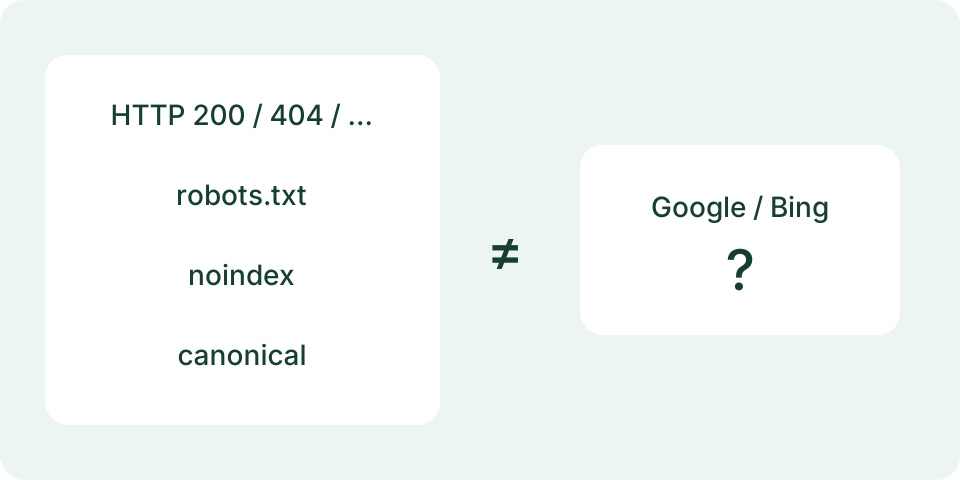
The server fetches the public page and robots.txt with bounded redirects, time and response sizes. It reads response headers and basic tags from raw HTML; it does not render JavaScript. robots.txt controls crawling, while a readable noindex rule controls indexing. A canonical declaration expresses a preferred URL, not a confirmed engine choice.
Worked Example
A hypothetical page returns HTTP 200 and includes a robots meta tag containing noindex. The successful response does not cancel that rule. A page returning 200 without detected noindex still has no guaranteed indexing outcome.
Check a Public Page's Signals
Enter the complete public HTTP or HTTPS page URL, including its intended path. Savvy Toolkit retrieves that address after Start and reports the final HTTP response, supported robots declarations, canonical declarations and a limited robots.txt interpretation. It does not connect to Search Console or Bing Webmaster Tools, search an engine's index or submit the page. A report without an obvious blocker is not confirmation that the page is indexed. Keep that question separate from the public technical observations shown here.
Use a URL that can be checked without login or credentials. Private and local network destinations, custom ports and unsupported protocols are rejected. Do not paste session links, passwords or confidential query values. The URL reaches Savvy Toolkit's server, which then contacts the public destination. Its request identifies itself as Savvy ToolkitPublicCheck, not Googlebot. A site's response to this server can differ from its response to your browser or a genuine search-engine crawler.
Start with the Final Response and Address
Compare the final URL with the submitted one. The checker follows a bounded number of HTTP redirects; it does not expose a complete redirect-hop table. A changed final host, path, scheme or slash can explain why declarations differ from the page you thought was being checked. A redirect limit, unsupported destination or request failure produces an unavailable result rather than a fabricated successful fetch. Stop is best-effort cancellation once work has reached the server.
The final status code is evidence about this request. A 200 response can still contain an error message, an empty shell or content that does not meet the intended task. A 404 response describes a missing resource for this request; it is not a direct report of an engine's saved indexing state. Inspect the actual response and the site owner's intended behavior. The tool does not score content quality, detect every soft 404 or guarantee ranking eligibility from a status code.
Read Declarations Without Filling Gaps
The output separates X-Robots-Tag response-header text from supported robots, googlebot and bingbot meta declarations in the HTML head. These are displayed observations, not a complete directive parser for every crawler. Canonical links found in the inspected head are resolved to HTTP or HTTPS addresses where possible. An absent declaration is not silently converted into a positive indexing instruction. The tool does not fetch a canonical target to verify its health or determine an engine's selected canonical.
HTML inspection is bounded and depends on a supported content type and encoding. A truncated body may omit a declaration later in the response, and a non-HTML response is not inspected as an HTML page. JavaScript is not executed, so declarations or content produced after rendering are outside the observation. The output explains those limits. Preserve a missing value as missing and an incomplete inspection as incomplete; neither should become a claim that the complete page contains no restrictions.
Distinguish Crawling from Removal from an Index
robots.txt controls crawler access under the relevant rules; it is not a reliable instruction to remove a URL from search results. A crawler blocked from fetching a page cannot read a noindex declaration on that page. Noindex and Disallow therefore answer different questions. Review the intended outcome before changing either. The checker reads robots.txt at the final page's origin, not at an unrelated original host after a cross-host redirect.
Savvy Toolkit's robots interpretation is intentionally conservative. It handles literal prefix paths for Googlebot or the general group and preserves unsupported syntax as unknown. Wildcard rules, escaped or non-ASCII paths and other crawler groups are not treated as fully evaluated. In this model a missing robots file returning 404 or 410 permits the limited access interpretation; request failures, incompatible content and unsupported cases stay unknown. The result is not a complete simulation of every search crawler's robots processing.
Work Through Two Signal Examples
Imagine a final HTML response with status 200 and a robots meta value of noindex, follow. The 200 says the response was delivered successfully; noindex is a separate declaration about indexing. Finding both is not a contradiction in HTTP. Check that the declaration matches the site's purpose. A private review page may deliberately use it. Removing it only makes sense for an approved public page, and does not itself establish that a search engine will keep the page.
Now imagine status 200, no observed noindex and an unknown robots decision because the file uses unsupported wildcard syntax. That is incomplete evidence, not an all-clear report. A canonical pointing elsewhere is another observation to compare with the intended duplicate handling, not automatic proof of an error. These examples are fictional response shapes. Savvy Toolkit does not infer live indexing status, ownership, content usefulness or an engine's choice from them.
Compare with the Owner's Actual Inspection Tools
For a site you control, use the search engine's verified webmaster tools to examine its recorded URL state and available live-fetch evidence. Google's URL Inspection distinguishes indexed information from a live test; those can reflect different times. Savvy Toolkit does not provide either account-connected report. Keep the exact URL and observation time aligned when comparing data. A cached search snippet, a site: search result and a technical fetch answer different questions and should not be merged into one certainty.
Investigate a mismatch by checking the final URL, deployment version, access controls and time first. Compare server-delivered HTML with the relevant rendered view where JavaScript matters. Consult server logs under the owner's existing access for actual crawler requests. Do not remove a deliberate privacy restriction just to get a positive-looking public checker result. No tool here proves that a newly edited page has been recrawled or that another fetch has replaced an engine's earlier state.
Handle Failures and Choose the Next Check
A busy, disabled, timed-out or unsupported request cannot produce a trustworthy page report. Note the state and retry the same public URL manually when appropriate. Reset clears the input and report; there is no automatic monitoring after success. The tool does not modify headers, robots files, canonicals, sitemaps or content. A failure to reach a site from this server is not evidence that the site is unreachable everywhere, and should not trigger an unrelated configuration change.
Use the DNS lookup for a separate question about a public name and selected record type. A valid DNS answer does not guarantee a successful HTTP fetch or indexing. Keep a concise evidence record containing submitted URL, final URL, time, status, observed declarations and inspection limits. That record helps the responsible owner investigate a specific mismatch without turning a limited public check into an unsupported verdict about search performance.
What the Result Means
Page HTML is limited to 256 KiB and robots.txt to 64 KiB. Unsupported wildcard rules, incomplete content or failed requests remain uncertain. A missing tag in the inspected HTML does not prove absence from the full rendered page. Server location and request identity can receive a different response from a search crawler.
Common Questions
Does a Passing Check Prove Google Indexed the Page?
No. Public response signals cannot reveal Google or Bing’s stored index status or guarantee future inclusion.
Does robots.txt Remove a URL from Search?
A crawl restriction alone is not an indexing-removal rule. A blocked crawler may not see the page’s noindex tag.