How to Use This Tool
- Enter the DDR transfer rate in MT/s and the CL timing for memory A.
- Enter the equivalent specifications for memory B; repeat A to calculate a single kit.
- Compare CAS delay alongside capacity, compatibility and actual operating settings.
Calculation Method
CAS delay ns = CL × 2000 ÷ DDR transfer rate MT/s. Memory clock MHz = MT/s ÷ 2. Difference = B delay − A delay.
Worked Example
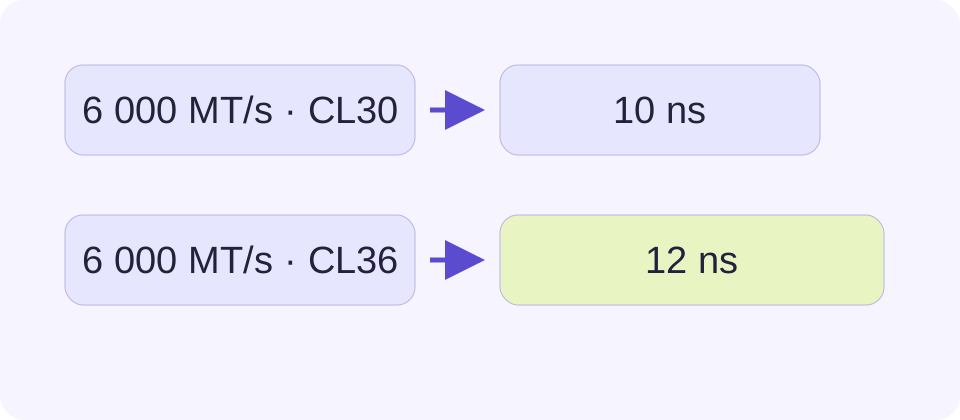
DDR-6000 CL30 gives 10 ns and a 3000 MHz clock. DDR-6000 CL36 gives 12 ns, so B minus A is +2 ns.
Enter MT/s Rather Than the Base Clock
The rate field expects the advertised DDR transfer rate in MT/s. A DDR-6000 specification means 6000 million transfers per second. Its base memory clock is 3000 MHz because DDR makes two transfers per clock. A monitoring utility that shows about 3000 MHz can therefore be consistent with a 6000 MT/s specification.
Entering 3000 in the transfer-rate field for that same memory doubles the calculated delay incorrectly. Read the unit in the utility instead of assuming every displayed frequency is an advertised DDR rate. Use specifications from the same operating profile. Combining a label transfer rate with a CL value from a different active profile creates a comparison that the memory is not actually using.
What CL Measures and What It Leaves Out
CAS latency, written CL or tCL, counts memory clock cycles for a particular read-command delay. The nanosecond conversion puts those cycles onto a time scale. It does not include every step between a processor asking for data and receiving it. Row state, other memory timings, the controller, access patterns and caches influence the complete path.
A lower calculated number answers the narrow question of which entered specification has less CAS delay. It does not produce an overall performance score. A memory upgrade can still depend more on adequate capacity or a supported configuration. Equal nanoseconds also do not make DDR generations interchangeable; the platform must support the correct module type.
Compare Two Specifications with the Same Formula
For A at 6000 MT/s and CL30, calculate 30 × 2000 ÷ 6000 = 10 ns. For B at 6000 MT/s and CL36, calculate 36 × 2000 ÷ 6000 = 12 ns. The displayed difference B minus A is +2 ns, meaning B has the larger calculated CAS delay. A negative difference means B has the smaller value.
Another pair, 3200 MT/s CL16 and 6400 MT/s CL32, both yields 10 ns. B has twice the transfer rate and twice the number of CAS cycles. Those changes cancel in this calculation. This is why comparing CL16 with CL32 without the transfer rates gives an incomplete answer.
| DDR Transfer Rate | CL | Memory Clock | CAS Delay |
|---|---|---|---|
| 3200 MT/s | 16 | 1600 MHz | 10 ns |
| 3600 MT/s | 16 | 1800 MHz | 8.89 ns |
| 6000 MT/s | 36 | 3000 MHz | 12 ns |
| 6400 MT/s | 32 | 3200 MHz | 10 ns |
Separate Rated Profiles from Active Settings
A retail memory label can describe a rated profile rather than the settings currently active in the computer. Firmware, motherboard support and processor memory-controller limits can lead to a different transfer rate or timing. The calculator cannot inspect those settings, enable a profile or check stability.
For a purchase comparison, use each complete rated specification and then verify support separately. For a comparison of current operation, use the actual rate and CL reported for the running system. Do not mix the two purposes. There is no need to change firmware settings merely to make a calculator result match an advertisement.
Use the Result to Narrow a Decision
Check capacity and platform support before treating a small CAS-delay difference as decisive. A workload that runs out of memory can behave very differently from one that fits comfortably, and this page does not model paging, application bandwidth or graphics performance. It also does not tell how much faster a game will run.
Both pairs require positive numbers. To calculate one kit, enter its same rate and CL in A and B; the delay values match and the signed difference is zero. Keep unrounded values for further arithmetic. A displayed 8.89 ns represents approximately 8.8889 ns, not a separate measured hardware result. The PC upgrade checker helps organize the broader evidence for a change.
The signed difference uses nanoseconds, not a percentage of computer speed. A +2 ns result between 10 ns and 12 ns does not mean an application is 20% slower. The application may wait on many other operations, and caches can avoid some memory accesses entirely. Keep that distinction when sharing the comparison or deciding how much an upgrade is worth.
What the Result Means
This calculates CAS delay only. It does not measure full memory-access latency, predict frame rates, approve compatibility or read the installed memory.
Common Questions
Why Does the Formula Use 2000?
DDR transfers data twice per memory clock. Clock MHz is half the MT/s rate; converting CL clock cycles to nanoseconds therefore gives CL × 2000 ÷ MT/s.
Are Two Kits with Equal Nanoseconds Equally Fast?
Their calculated CAS delay is equal. Bandwidth, other timings, capacity, ranks, controller settings and the workload can still differ.