How to Use This Tool
- Choose wall watts or component-side DC watts for one server.
- Enter the server count, daily running hours, number of days and energy price.
- Review fleet wall watts, kWh and energy cost; compare a second workload separately.
Calculation Method
Wall mode uses the entered watts directly. DC mode divides watts by PSU efficiency as a decimal. Multiply wall watts by server count, hours per day and days, then divide by 1,000 for kWh. Multiply kWh by the entered price for cost.
Worked Example
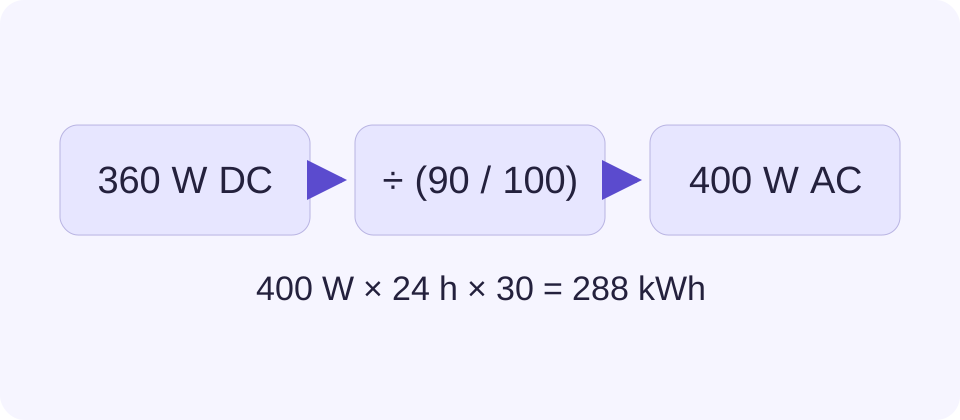
Two servers at 180 W DC each and 90% efficiency draw 400 W together at the wall. Running 24 hours daily for 30 days uses 288 kWh. At 0.20 per kWh, energy costs 57.60 in the same currency.
Start with a Representative Reading
Use a reading taken during the workload the server will actually run. A short idle observation cannot describe a nightly backup, a virtual-machine cluster at peak load or an accelerator job. Record the workload, measurement duration and included equipment beside the watts. A longer energy-meter observation can be more useful than one rapidly changing display.
A management controller may show input watts, output watts or a separate processor value. Read its label before copying the number. For redundant supplies, use total server input rather than one supply alone. Count refers to identical servers with the same assumed load; run different server groups separately and add their energy totals.
Keep DC Load and Wall Input Separate
For the example, each supply delivers 180 W to components while drawing 200 W from the wall. The 20 W difference is conversion loss. A wall meter already includes that difference, so entering 200 W in DC mode would apply a second adjustment and overstate consumption.
Efficiency must describe the relevant load and input conditions. A certification tier is not a fixed efficiency at every operating point. Use measured or documented efficiency for the scenario, or compare several explicit assumptions. Do not use the PSU nameplate capacity as component load.
Read the Billing Period Correctly
Hours per day describes time at the entered average load. Choosing eight hours does not include the other sixteen hours of idle or standby draw. Calculate those hours as another scenario when they matter. Days specifies the exact period; a 30-day estimate is not an annual total.
Enter the energy price in the currency used for the desired result. A price written in cents must be converted to whole currency units first. Fixed fees, peak-demand charges and changing time bands need separate billing calculations. The result can compare operating scenarios, but it is not a complete utility invoice.
Check the Boundary Before Comparing Servers
A rack meter may include switches or storage that a server-only controller excludes. Compare like with like. Cooling and an upstream UPS also sit outside the server boundary unless the meter includes them. No data-centre overhead factor is silently added.
Keep the recorded watts, time and tariff with the result so another person can reproduce it. For battery backup, the UPS runtime calculator uses a different task and its own assumptions; this energy estimate alone does not certify a UPS or circuit.
What the Result Means
This is an entered-load estimate, not remote server monitoring or electrical circuit sizing. It excludes cooling, network equipment, separate UPS losses, standing charges and variable tariffs unless already inside the measured load.
Common Questions
Does a 1,000 W PSU Always Consume 1,000 W?
No. Its capacity rating is not its present load. Use a representative wall-power measurement or documented DC load.
Should I Add Both Redundant PSU Ratings?
No. Measure the combined input to the server. Redundancy configuration and actual load determine draw.