How to Use This Tool
- Enter the planned number of photos and their measured mean file size in decimal MB.
- Add the video duration in minutes and its complete-file average bitrate in Mbps.
- Choose an extra allowance for the planned shoot and compare the total with actual free card space.
Calculation Method
Photo bytes equal photo count × mean MB × 1,000,000. Video bytes equal minutes × 60 × Mbps × 1,000,000 ÷ 8. Add both and multiply by one plus the allowance fraction. The allowance adds to the planned data; it is not a reserved fraction of final card capacity.
Worked Example
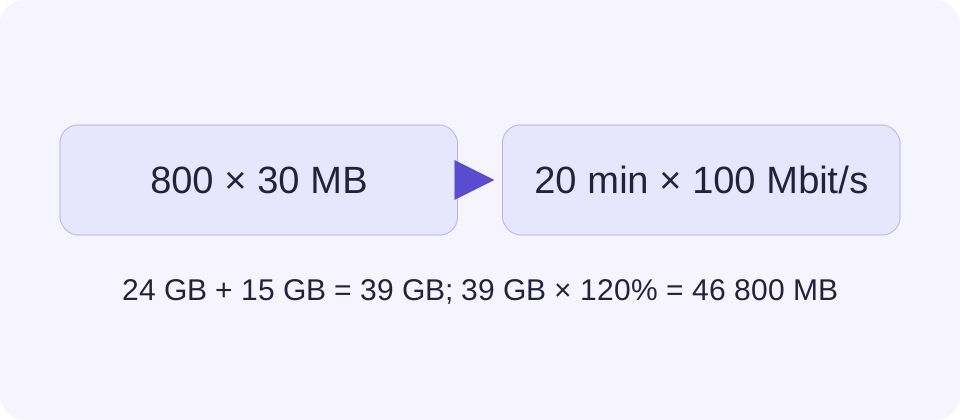
800 photos at 30 MB total 24 GB. Twenty minutes at 100 Mbps adds 15 GB. The combined 39 GB becomes 46.8 GB after adding a 20% allowance.
Measure a Real Average Photo Size
Use files from the same camera mode planned for the shoot. Select several representative images, total their bytes and divide by the number of shutter presses. Include fine detail and higher-ISO scenes as well as simple pictures. One unusually small JPEG is a weak basis for a full day’s storage.
For RAW+JPEG, include both files in each exposure’s average. Add associated files that will stay on the card. A computer may label binary MiB as MB, so check the original bytes when precision matters: divide bytes by 1,000,000 for this input. Megapixels do not establish compressed photo size.
Use the Complete Video Recording Rate
Record a test clip in the selected camera mode. Divide its full file size in bytes by its actual duration in seconds, multiply by eight and divide by 1,000,000 to obtain Mbps. A full-file measurement includes whatever audio and container data that file contains. Do not add the same audio again.
A menu bitrate can be nominal or a ceiling. Variable-rate recordings can grow differently with scene detail and motion. For a higher-confidence plan, compare several clips from demanding scenes, not only a static test. Run separate calculations for modes with different rates and add their base data before applying one shared allowance.
Combine Photos and Video Before Adding the Allowance
This calculator plans a mixed shoot. Photo-only and movie-only card capacities cannot both be claimed for the same free space. Add the two data amounts first, then add the selected allowance. The table uses an example rate, not a camera recommendation. Changing bitrate or photo size changes the answer directly.
An additional 20% means multiplying planned data by 1.2. It does not promise that 20% of a card will remain empty. To preserve a particular free-space fraction, account for that requirement separately when comparing available capacity. The card’s printed size is also not its current free space.
| Part | Calculation | Data |
|---|---|---|
| Photos | 800 × 30 MB | 24 GB |
| Video | 20 min × 100 Mbps | 15 GB |
| Combined | 24 + 15 | 39 GB |
| With 20% extra | 39 × 1.2 | 46.8 GB |
Check the Card and the Backup Plan Separately
Compare the result with free space shown after formatting in the camera, allowing for existing files and device overhead. A 46.8 GB plan does not establish an exact number of shots that every nominally larger card will hold. Test the actual recording mode and check the manufacturer’s capacity and file-system support.
Enough capacity does not prove sufficient sustained write speed. Follow the camera manual’s supported card type and speed class, then test a representative continuous recording. Storage also does not remove thermal, battery, clip-duration or file-size limits. For important footage, plan separate verified copies rather than treating a spare percentage on one card as protection against failure.
What the Result Means
The tool does not predict photo size from megapixels, measure a camera or certify a card. Variable bitrate, RAW+JPEG, proxies, audio, file-system overhead and camera recording limits can affect the plan. Keep independent backups.
Common Questions
Should I Count RAW and JPEG as Two Photos?
Use one consistent approach. For 800 shutter presses saved as RAW+JPEG, enter 800 and the combined mean size of each RAW/JPEG pair.
Does Enough Space Prove the Card Is Fast Enough?
No. Storage capacity and sustained write speed are different requirements. Follow the camera maker’s supported card types and speed rules for the selected mode.