How to Use This Tool
- Enter a public DNS name, not a full page URL, login value or private internal hostname.
- Choose the required record type and start the lookup. The submitted name is sent through Savvy Toolkit’s server to Google Public DNS.
- Review returned record names, types, data and TTL values with the DNS status. Keep an empty answer, a DNS error and a failed request distinct.
Calculation Method
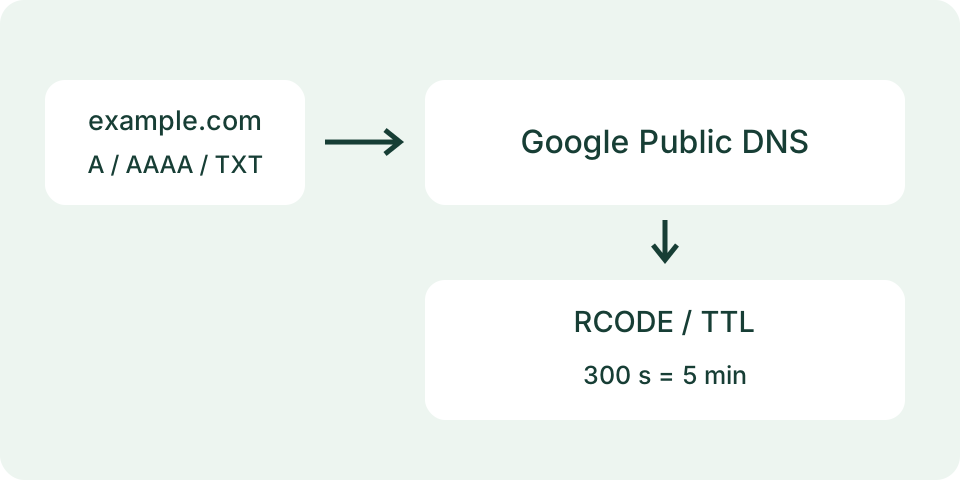
The server uses Google’s documented JSON DNS-over-HTTPS endpoint. A records contain IPv4 addresses; AAAA records contain IPv6 addresses. CNAME identifies an alias, MX mail routing, NS name servers, TXT text data and SOA zone information. A recursive resolver may answer from its cache. TTL is a cache lifetime in seconds, not proof that all other resolvers have updated.
Worked Example
In a hypothetical A answer, a TTL of 300 means five minutes of reported cache lifetime. The returned IP address describes that resolver’s answer at the shown time. It does not prove the website responds or that every network receives the same answer.
Query a Name, Not a Page Address
Enter the domain name whose DNS record you need, such as example.com, without https://, a path, a port or an email address. A host such as www.example.com is a different name from example.com and can return different records. A single final dot is removed during normalization; supported internationalized names are converted to their DNS form. The form rejects malformed names instead of guessing which part of a pasted web address matters. It does not enumerate subdomains.
Choose one record type and start the lookup. The available types are A, AAAA, CNAME, MX, NS, TXT and SOA. Changing the name or type clears the old result. Savvy Toolkit asks Google Public DNS through its server endpoint after that action; it does not inspect your computer's DNS cache or automatically query every type. Treat the displayed query time as the time of this observation, not the date when a website changed its records.
Choose the Record for the Question
A asks for an IPv4 address and AAAA for an IPv6 address. CNAME asks about an alias, MX about mail-routing records and NS about name-server records at the queried name. TXT can contain several unrelated text records; the displayed value does not certify a mail policy, domain verification or account ownership. SOA contains zone information. This tool displays returned data rather than validating the complete configuration behind each record type.
No A answer does not imply that a name lacks AAAA, MX or TXT data. Query the type relevant to the task before drawing a conclusion. Likewise, asking NS for a particular host is not a full report of delegation at every parent zone. The tool has no CAA or PTR selector, authoritative-server mode, resolver picker or worldwide propagation map. Use a specialized diagnostic for those questions rather than interpreting missing controls as empty DNS results.
Read Response Code and Answers Together
The response code summarizes the DNS response, while the answer table lists the returned records. Code 0, NOERROR, can have no answers for the selected type. Code 3, NXDOMAIN, reports that the queried name does not exist in that resolver response. Code 2, SERVFAIL, is a resolution failure and should not be rewritten as name absence. A request failure in Savvy Toolkit is a separate condition: no valid provider response was available to interpret.
The table shows each record's name, type, TTL and value. The requested type and the returned type are not always identical across all rows: an answer may contain alias-related records. Unknown numeric record types remain numeric instead of being relabeled as the selected type. An empty table does not contain a hidden successful address. Preserve the query name, selected type, response code and time when comparing two checks so a changed question does not look like a changed answer.
| Code / state | Meaning |
|---|---|
| 0 NOERROR | Valid DNS response; selected type may have no answers |
| 2 SERVFAIL | Resolution failed |
| 3 NXDOMAIN | Queried name absent in resolver response |
| Request unavailable | No valid DNS response to interpret |
Interpret TTL Without a Propagation Promise
TTL is a duration in seconds associated with a returned record, not an expiry date for the domain or a countdown until every visitor sees a change. A recursive resolver may return a cached answer with a remaining TTL. Other resolvers, local caches and different requested names can produce different observations. A value of 300 seconds equals five minutes, but that arithmetic cannot establish that a pending change will reach everyone five minutes after this lookup.
For a planned change, keep the old and intended records and compare a fresh observation with that plan. Repeat the same name and type before comparing data, and consult the authoritative configuration separately. Savvy Toolkit does not save a history or poll for completion. A fresh query timestamp is not proof that the recursive answer was freshly retrieved from an authoritative server. The result is one named resolver's response under its current resolution behavior.
Distinguish DNS from Service Availability
An A or AAAA answer supplies address data. It does not establish that the target serves HTTPS, accepts mail, presents a valid certificate or responds from your network. An MX record does not test a mailbox, and TXT output does not check whether an entire sending configuration passes authentication. Those tasks require separate observations. The indexing checker can inspect supported public HTTP responses and declarations; it still cannot certify search-engine indexing or identify every service problem.
Use a fictional comparison to keep the distinction clear: code 0 with an address answer and a browser connection failure can coexist. That does not make the DNS response invalid or identify the browser failure's cause. Conversely, code 0 with no A answers is not the same as a failed provider request. The examples describe possible response shapes, not live checks of example.com or an assertion that a particular site is currently working.
Handle Incomplete Results and Request Failures
The endpoint limits provider response size and keeps at most 100 answer records. A displayed truncation notice means the result is incomplete, so do not use its visible rows as an exhaustive record inventory. Provider timeout, malformed data, busy service or disabled endpoint states remain failures or unavailable results. Restart the same manual query after noting the state; the tool does not repair DNS records or change resolver settings to make a failure disappear.
Stop and hiding the tab cancel the browser request; cancellation is best effort once work has reached the server. Reset clears the input, selects A and removes the result. No automatic refresh follows a successful lookup. Changes to DNS should be made through the responsible provider with the existing configuration preserved. A failed lookup alone is not a reason to delete records or substitute an arbitrary public address, especially when the response code has not been obtained.
Know Where the Query Goes
The submitted name and record type reach Savvy Toolkit's server and Google Public DNS. The request uses a zero-length client-subnet setting, which avoids forwarding a client-subnet hint for resolution; it is not an anonymity or no-logging guarantee. The browser request itself still reaches the site's host, where normal request handling and logs depend on the hosting configuration. Avoid entering private names or confidential information. This page does not ask for account credentials or upload local configuration files.
Save only the evidence needed for the task: name, type, resolver, time, code, rows and any incomplete-result warning. Compare that record with the intended configuration or another independently obtained observation. DNS data, HTTP availability and search indexing answer different questions. Keeping those steps separate prevents a successful record lookup from becoming an unsupported claim about the website, its visitors or its search visibility.
What the Result Means
Results come from one public resolver and are bounded. Local DNS, split-horizon zones, location-aware answers and cached records can differ. An empty successful answer can mean the requested type is absent; it does not by itself prove the domain is nonexistent. A timeout or invalid response is unavailable, not a fabricated DNS result. This tool does not inspect the device’s DNS settings.
Common Questions
Does an a Record Prove the Website Is Online?
No. DNS resolution and an HTTP connection are different checks.
Does TTL Count Down Until Global Propagation Finishes?
No. TTL concerns caching of that answer. It does not measure every resolver or authoritative update.