Name the Failed Task Before Changing Settings
Write down what is failing: resolving a name, opening a particular page or finding a page in a search engine. These are separate tasks. DNS returns records associated with names. HTTP describes an exchange with a web server. Search indexing describes what an engine has processed and retained. A successful observation at one layer does not prove success at the next. Begin with the exact task and a reproducible example rather than changing DNS, robots and redirects together.
Record the affected name, complete page URL, time and source of the observation. Keep private session tokens and account details out of public tools. Note the device and network when the problem is seen in a browser, and the site version when the problem follows a deployment. The goal is a small set of comparable observations. Without that record, an old index report, a cached DNS answer and a current browser error can look like one event when they refer to different questions.
| Layer | Question | Does not prove |
|---|---|---|
| DNS | Name and selected record type | HTTP service or indexing |
| HTTP | Final page response and declarations | Engine has indexed the page |
| Engine report | Recorded or live engine observation | All visitor paths currently work |
Keep the Query Name Separate from the Page URL
The DNS question concerns a name such as example.com or www.example.com. It does not include https:// or a page path. Those two names can have different records and should not be treated as interchangeable. The HTTP question includes scheme, host and path, and may redirect to a different address. A working homepage does not establish that a deeper path exists. Write the DNS name and full page URL on separate lines so each tool receives the right kind of input.
Use Savvy Toolkit's DNS lookup with one of its seven supported record types, then use the indexing checker for an eligible public page URL. Neither tool reads an authenticated account page. The DNS lookup uses a fixed Google recursive resolver; the HTTP checker requests from Savvy Toolkit's server. Neither reproduces every user's local network. Changing your own device's resolver is a separate configuration operation and should not be a first response merely to make one tool's observation match another.
Choose a DNS Record That Answers the Task
For an address question, examine A for IPv4 and AAAA for IPv6 separately. A missing answer in one does not prove the other is absent. For mail routing, MX is relevant, but a returned MX does not test a mailbox. TXT can hold several independent records and is not a general validation result. NS and SOA answer different zone questions. The tool displays the records it receives rather than certifying the domain's complete configuration or discovering every subdomain.
Keep response code and answer rows together. NOERROR with no selected-type answers differs from NXDOMAIN, and SERVFAIL is not name absence. A provider request failure has no valid DNS response to interpret. Alias rows can appear beside the requested record type, so compare both name and type on each row. A truncated result is not a complete inventory. The returned numeric types, values and limitations provide evidence; do not replace them with a simpler success label that changes their meaning.
Use TTL as a Cache Observation
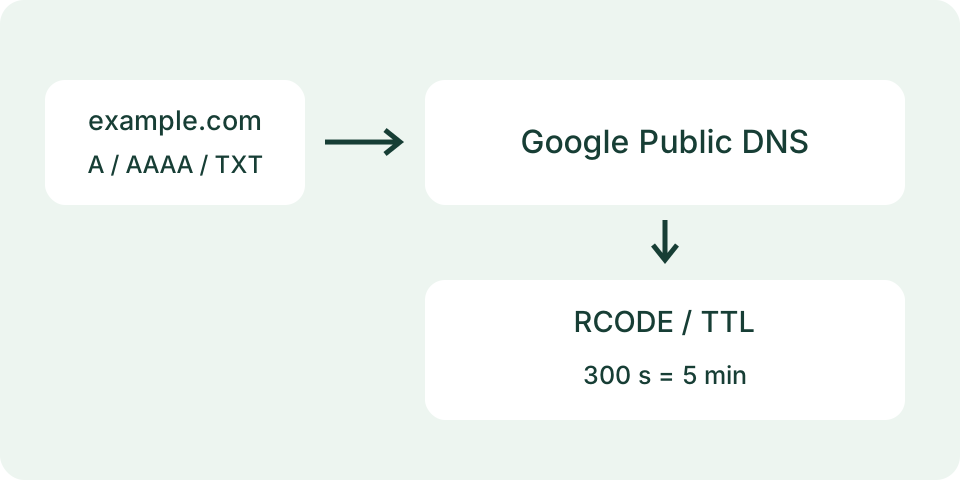
TTL is shown in seconds. A hypothetical value of 300 seconds equals five minutes. It does not establish a global deadline for a record change. A recursive resolver may return a cached answer with a remaining TTL, while another resolver sees different data. The displayed query time says when the observation was made, not when the authoritative configuration changed. Keep the old intended record and the new intended record so a later comparison has a clear target.
Repeat the same name and record type when comparing a change. Examine the responsible provider's authoritative configuration through the owner's existing access separately from public recursive observations. Do not delete records or change several resolvers simply because one answer differs. Savvy Toolkit does not poll for worldwide completion or save a history. Documenting one resolver, one question and one time is useful; presenting it as what every visitor currently sees exceeds the evidence.
Check HTTP Without Treating DNS as the Verdict
An address answer can coexist with a missing web path. In a fictional case, DNS returns an A record for the host, while the requested page returns HTTP 404. The name resolved, but that does not create the page. In another fictional case, no AAAA answer is returned while a browser reaches the site over IPv4. Neither example is a live observation about example.com. They show why an empty record of one type and a failed page request should not be merged into a universal outage claim.
The HTTP check should use the exact intended public URL. Compare its final URL, status and time with the browser observation. A redirect may move the request to another host or path, whose declarations now matter. Savvy Toolkit follows only a bounded number of redirects and does not display every hop. It does not execute JavaScript or authenticate. A failure from its server can have a different cause from a failure in the user's browser; preserve both perspectives without assigning a cause prematurely.
Separate Response Status from Useful Page Content
A 200 response means the request received that success status. It can still deliver an error message or an empty application shell. Examine the actual page content for the task rather than relying only on the code. Savvy Toolkit does not score content or classify every soft 404. Its HTML inspection is limited by response size, content type and encoding. A missing declaration after an incomplete inspection is not proof that the complete response lacks that declaration.
For a site change, compare the intended deployment with the server-delivered page and a relevant rendered view. Keep the final host and path aligned. A stale response or a redirect to another version can explain a mismatch without requiring new DNS settings. The owner can inspect server logs with their existing access to compare real requests. Avoid claiming that Savvy Toolkit's user agent is Googlebot or that its public fetch proves how a genuine crawler is being treated.
Keep Crawl Access and Indexing Directives Distinct
The indexing checker reports observed header and HTML declarations as well as a limited robots.txt decision. It does not connect to an engine's index. A visible noindex can be deliberate on a private review page. A robots.txt Disallow controls access and does not itself establish removal from results. A blocked crawler cannot read the page's noindex. Choose the intended public or private behavior first, then review the relevant declarations rather than removing restrictions to produce a positive-looking report.
Unknown robots processing must remain unknown. Savvy Toolkit's literal-prefix parser does not fully evaluate wildcard syntax, escaped paths or every crawler group. Its final-origin robots file can also be unavailable or incompatible. Canonical links are observations about preferred duplicate handling; the tool does not verify the target or establish the engine's choice. A canonical to another page is not automatically an error. Compare it with the site's actual duplication plan and preserve ambiguous signals for the owner's inspection.
Consult Indexed Information and Live Evidence Separately
For an owned site, use the relevant verified webmaster tools for information available from the engine. Google's URL Inspection distinguishes recorded indexed information from a live test. A page may have changed after the indexed observation, so align timestamps and exact addresses before comparing. Savvy Toolkit provides public technical evidence instead of those account-connected reports. A site: search or cached snippet is a different observation again and should not become a precise substitute for the available verified URL report.
An apparently clear public fetch does not guarantee that an engine has crawled, chosen or retained the page. Submission is also a different event from indexing. Review the page's intended task, discoverable contextual links and useful original content alongside technical observations, without treating a word count as a ranking target. This guide's length follows the project brief. It does not supply an indexing guarantee, a traffic forecast or an excuse to create repeated pages that add no useful answer.
Resolve Conflicts with One Changed Variable
Start a comparison table with question, input, source, time, result and limit. Recheck an unchanged question before changing configuration. Then alter only the responsible setting through the owner's usual access, preserving the previous value and a route back. A new record, deployment, redirect or directive should be compared with its intended effect. Changing all of them at once makes it harder to tell which change mattered and can interrupt services that were not part of the failed task.
Keep private drafts private while checking public-release settings in an approved test build. A correct local metadata fixture is not a public deployment or proof of domain ownership. Before later publication, the owner should verify actual hosted responses and the intended robots, canonical and sitemap behavior. Savvy Toolkit's tools do not perform that deployment or edit the site. The outcome of this workflow is a reproducible set of observations and a scoped next action, not a green badge covering every layer.
Save a Concise Evidence Packet
For DNS, keep queried name, type, resolver, query time, response code, relevant rows and truncation state. For HTTP, keep submitted and final URL, time, status, declarations and inspection limits. For an engine report, keep exact URL, report type and observation time under the owner's access. Do not include passwords, session links or confidential records in a public correction request. These separate records allow another person to follow the question without confusing a current result with an older one.
End the investigation with the next unanswered question. A record mismatch belongs with the DNS configuration owner; a wrong final path belongs with the routing or deployment owner; an engine-selected canonical belongs with the relevant verified report and site plan. The DNS lookup and indexing checker help collect limited public evidence for those tasks. They do not replace access to the responsible system or prove that every possible failure has been excluded. Keep the limit beside the result when sharing it.