Choose the Check That Matches the Failure
A website can accept a TCP connection, present a certificate and still display an error page. These are separate stages. A port check asks whether a connection reached the selected port from the checking server. A certificate check examines the TLS connection and the certificate returned for a hostname. An HTTP check asks what the web application sent after the connection was established. Record which stage failed before changing settings.
Start with the exact address that fails in a browser, including a subdomain such as shop.example.com. Note the warning text, time and affected devices. A warning on one old phone calls for a different investigation from a timeout on every device. Keep one small change per retest so that the result can explain what changed.
| Check | Useful observation | What it does not establish |
|---|---|---|
| TCP port | A connection to the selected port completed | A valid certificate or working web page |
| TLS certificate | The returned certificate and validation findings | A clean website or every client’s compatibility |
| HTTP response | The server returned a status and content | That every link, login or checkout works |
Enter the Hostname Visitors Actually Use
For a certificate lookup, use the public hostname rather than a path, account password or hosting-panel address. The name in https://shop.example.com/cart is shop.example.com. The /cart path does not select the TLS certificate. The usual HTTPS port is 443, but the correct port for a service comes from its configuration. A name that redirects to another name still needs a usable TLS connection before an HTTPS redirect can be received.
A domain and its www version are different names. A certificate for example.com does not automatically cover www.example.com. A wildcard such as *.example.com usually covers shop.example.com, but does not cover the bare example.com name or a deeper name such as pay.shop.example.com. Read the actual alternative-name entries and the hostname result together; the attractive certificate display name is not the coverage list.
Read the Certificate Fields in a Useful Order
Begin with hostname coverage, the validity window and the trust finding. Subject Alternative Names, often shortened to SANs, identify the names included in the certificate. The issuer identifies the organisation or certificate authority named as its issuer. Neither field is a review of the website’s products, business practices or software. A certificate can authenticate a connection to a harmful website just as it can authenticate a useful one.
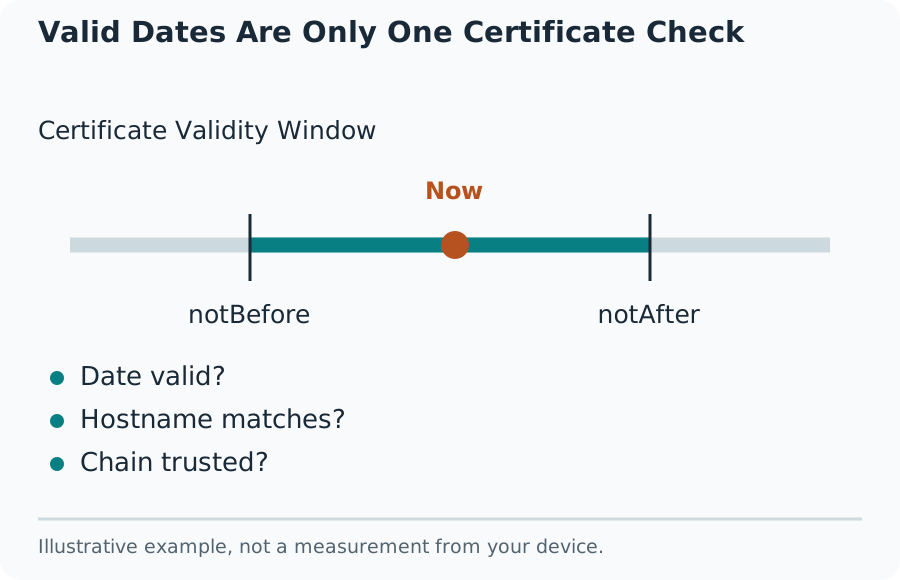
Compare the expiry timestamp with the check timestamp, not with an old screenshot. The start date matters too: a certificate whose validity has not begun can fail despite having months left before expiry. Date-only summaries can hide a boundary near midnight. Treat a displayed days-remaining figure as a planning aid and retain the underlying timestamp when reporting a problem.
Valid Dates Are Only One Certificate Check
Keep Hostname Matching and Trust Separate
A certificate can contain the right hostname and still fail trust validation. An expired intermediate, a missing intermediate certificate, a private certificate authority or an outdated trust store can produce different failures. The chain connects the site certificate to an authority the client trusts. The server’s installation and the client’s trust configuration both matter; replacing the leaf certificate is not automatically the correct repair.
A server-side check uses that server’s TLS library and trust store. It cannot promise the same outcome on every phone, browser or embedded device. Compare the failing client’s software version, system clock and exact warning with a current browser. Do not install an unknown root certificate or disable certificate checking merely to remove the warning. Ask the hosting provider for its supported chain and installation procedure.
Check the CSR Before Ordering or Reissuing
A certificate signing request, or CSR, is a request containing a public key and requested identity information. It is not the issued certificate, and decoding it does not contact the live website. Paste only a CSR block into the CSR Decoder. Keep its beginning and ending markers intact. A file marked PRIVATE KEY belongs in protected key storage, never in a public form, support post or screenshot.
Compare the requested names and key details with the certificate order and deployment plan. A decoder reports fields that are present; it cannot decide which names the business needs or promise that an authority will issue the requested extensions. An absent requested SAN does not by itself prove what a later certificate will contain. Check the order settings and then inspect the issued certificate separately.
Know What Decoding Does Not Verify
Reading the CSR’s structure is different from verifying its signature or proving possession of the matching private key. A decoded name is a claim made in the request, not proof of domain control. The certificate authority carries out its own validation. The Savvy Toolkit decoder is an inspection aid; do not treat a readable request as a signed-off certificate order or as confirmation that its private key is available on the server.
An administrator can independently inspect a saved request with openssl req -in request.csr -text -verify -noout. The -verify option checks the request’s self-signature; it does not establish public trust in a future certificate. Run this locally on a copy of the CSR and keep private-key files out of shared terminals and logs. A successful parse without signature verification answers a narrower question.
Interpret an Open Port Result Correctly
Use a single-port check for a public service that you own or are authorised to test. Enter its intended public hostname or IP address and the configured TCP port. A successful connection means that something accepted a TCP connection at that destination from the checker’s network at that time. It does not identify the program, confirm its login works or establish that the service should be exposed.
A refused connection and a timeout need different follow-up. Refusal usually indicates an explicit rejection somewhere on the path. A timeout means the connection did not complete within the test window; filtering, routing, address errors or a service problem remain possible. Do not label every timeout a closed port. The checker does not test UDP, and a result for TCP port 53 says nothing conclusive about UDP DNS.
For Port Forwarding, Check the Whole Route
A home-server test requires the application to be running and listening on the intended local address and port. A forwarding rule points an outside port to that device and service. A computer firewall, router rule and provider network can each affect the path. Check the service locally before adjusting the router. Leave unrelated firewall settings intact and avoid opening a wide range of ports to diagnose one service.
Compare the router’s WAN address with the public address visible outside the network. Private addressing, carrier-grade NAT or a second router can mean that a forwarding rule on the nearest router is not the whole route. Public IPv6 has a different exposure and firewall model from IPv4 NAT. A successful test from inside the same Wi-Fi also may use a different path from an external connection.
When Hosting, DNS and Certificates Disagree
After a migration, some addresses can still reach an old server while others reach the new one. A domain can publish both IPv4 and IPv6 records, and those destinations may serve different certificates. A content-delivery network can also terminate the visitor’s TLS connection before forwarding traffic to the origin. The certificate visible publicly may therefore belong to the edge service rather than the hosting server you just edited.
Record the checked hostname and any destination address the result actually supplies. Check the DNS records against the hosting provider’s instructions and review both address families. Keep the intended hostname in a TLS test: connecting only to an IP can cause a shared server to return its default certificate. Do not change DNS repeatedly while comparing results, because that creates extra variables instead of isolating the fault.
A Worked Diagnosis Without Guessing
Consider an illustrative shop where https://example.com loads but https://www.example.com shows a name warning. The port checker connects on 443 for both names. The certificate check for www.example.com returns a certificate whose SAN list contains only example.com. That combination points to a coverage or virtual-host configuration problem, not a need to open another firewall port. Check the intended certificate assignment for the www name.
Now change the observation: both names have the expected certificate, but one older device reports an untrusted issuer. That evidence calls for checking the served chain, the device’s clock and its trust-store support. It does not prove that every user needs a new certificate. These examples demonstrate reasoning from observations; they are not measurements of a real shop, nor a guarantee that the same repair fits every warning.
Make the Repair Verifiable
After a certificate or chain change, repeat the original hostname check and record the new serial number, fingerprint or validity dates only when those fields are available. A control panel saying installed is weaker evidence than a fresh connection returning the intended certificate. Test each public name, the browser that originally failed and any separate service port that matters to the application. Remove temporary diagnostic exposure after the check.
For a support request, provide the public hostname, port, timestamp, exact warning and a short before-and-after result. Include no passwords, private keys, session cookies or customer data. Ask the provider to confirm the certificate binding, intermediate chain and renewal process. A one-off check is a snapshot, so establish who owns renewal and how failures will be noticed rather than relying on memory of today’s successful result.