How to Use This Tool
- Enter a public hostname or IP address for a system you own or are authorized to test.
- Enter one TCP port from 1 to 65535.
- Run the check and distinguish a connection, refusal and timeout.
Calculation Method
A server-side TCP connection attempt tests one resolved public address and one port. It does not use a browser fetch as a substitute for a socket connection.
Worked Example
A service listening on TCP 25565 can accept a check only when the public address, forwarding rule, local firewall and listening application all allow the same connection.
Choose the Target and Transport
Enter the public destination that outside clients actually use. A computer’s address such as 192.168.1.20 belongs to a private network and cannot be reached directly by this public checker. The target can also differ from the address shown on a router when the Internet provider places the connection behind carrier-grade NAT.
TCP and UDP are distinct transports even when their port numbers match. A successful TCP check on port 53 says nothing about DNS requests sent over UDP. This checker tests one TCP port at a time. Use a service-specific client when the task depends on an application response rather than a connection handshake.
Reachability Results Have Different Meanings
Understand Each Result
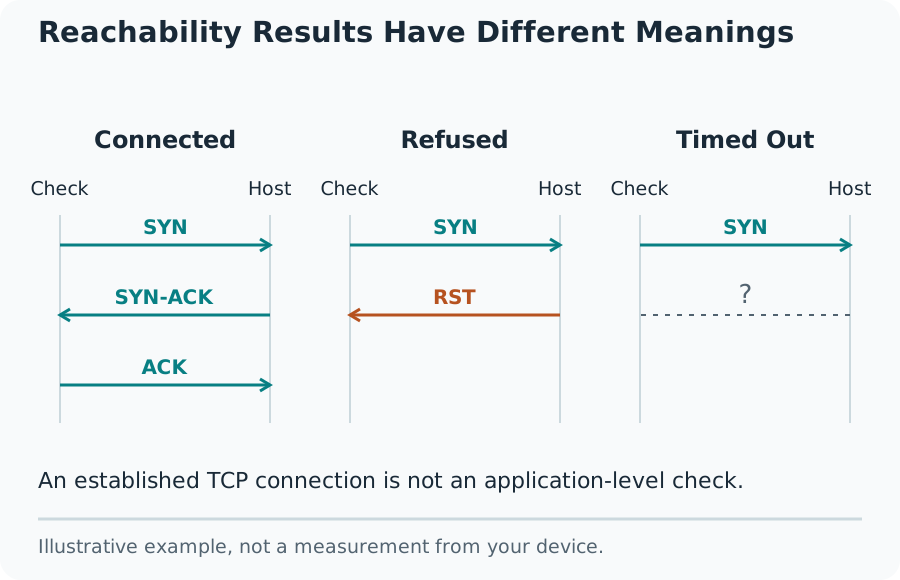
An accepted connection means the tested address and port allowed the website server to complete a TCP connection during this attempt. It does not identify the application with certainty. Port 443 is commonly HTTPS, but a port number does not force the program listening there to be a web server.
A refusal commonly means the destination or an intermediate device actively rejected the connection. A timeout means no successful connection or explicit refusal arrived before the deadline. Filtering, routing problems, packet loss and an unavailable host can all produce a timeout. The result cannot locate the cause on its own.
Check Port Forwarding in a Useful Order
First confirm that the intended application is running and listening on the correct local interface. Next check the operating-system firewall. Then verify that the router forwards the external TCP port to the correct local address and internal port. A rule aimed at an old DHCP address can fail after a device reconnects.
Compare the router’s WAN address with the public address reported for your connection. A mismatch can indicate another router or provider NAT, although proxies and VPNs can also change the comparison. Do not open unrelated ports to chase a positive test. Remove temporary forwarding rules after the intended check.
Limits of an External Check
This request originates from the site’s hosting network. A service can allow that network and block another country or provider, or the reverse. Hostname results can also vary across IPv4, IPv6, geographic DNS and load-balanced addresses. Keep the resolved address and time beside the result.
A hosting firewall can prevent outgoing connections and make the measurement unavailable. Such a failure must not be presented as a closed target. Test only authorized systems. A port check does not audit passwords, encryption, vulnerabilities or the correctness of a game, mail or remote-access session.
What the Result Means
This is a point-in-time TCP reachability check, not a UDP test, a vulnerability scan or proof that an application works correctly. Private and special-use targets are rejected.
Common Questions
Why Does My Port Look Closed?
Common causes include no listening service, the wrong public IP, a missing forwarding rule, a firewall, carrier-grade NAT or a provider restriction.
Does Open Mean Secure?
No. Open describes a successful connection. Authentication, software updates and application configuration need separate checks.