How to Use This Tool
- Copy the MAC address from the device settings, label or your own router inventory.
- Enter the complete 48-bit address, then run the lookup.
- Read the registered organization together with the local and group address flags.
Calculation Method
The lookup normalizes hexadecimal address notation and checks its prefix against a public registration database. The result identifies a registered address block, not a serial number.
Worked Example
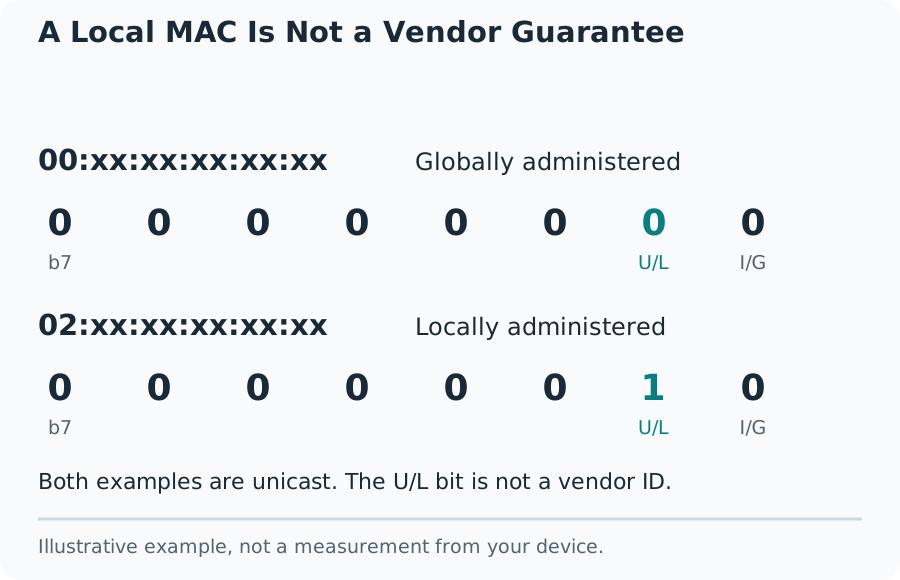
02:00:00:00:00:01 has its locally administered bit set. A manufacturer name inferred from the leading digits would not reliably identify the device.
Choose the Right Address
An Ethernet adapter, Wi-Fi adapter and Bluetooth controller can have different hardware addresses on the same computer. Copy the address for the connection being investigated. Router client lists can show a private Wi-Fi address chosen for that particular network, rather than the value printed on the product label.
Use twelve hexadecimal digits. Common representations include six pairs separated by colons or hyphens, and three groups separated by dots. Do not paste an IPv6 address, an SSID or a router password. This page cannot discover nearby interfaces or read the hardware address of a website visitor.
A Local MAC Is Not a Vendor Guarantee
Read the Registration and Address Flags
IEEE allocates blocks with different prefix lengths. MA-L uses 24 registered bits, MA-M uses 28, and MA-S uses 36. A full address allows a lookup provider to select a more specific assignment. Looking only at the first three bytes can conceal a smaller block registered to another organization.
The two low-order bits in the first byte describe different things. The least significant bit distinguishes individual from group addresses. The next bit distinguishes universally administered from locally administered addresses. A group address is not the identity of one physical interface. A local address may be generated by an operating system, hypervisor or administrator.
Turn a Match Into a Useful Check
A registered organization may be the network-chip supplier, an equipment manufacturer or an organization that obtained the block. Compare it with the device label, model documentation and the expected adapter. A surprising vendor is a reason to investigate, not proof of an intruder or counterfeit product.
For example, a laptop brand can differ from the company that registered its Wi-Fi chipset prefix. Record the MAC, interface name and connection time in your own inventory. During troubleshooting, a stable device name and a known switch port can be more useful than a vendor label alone.
Handle Missing Results and Protect Your Inventory
A no-match response means the provider returned no public registration for that address. A timeout, rate limit or service failure means the lookup did not finish. Repeating a request immediately many times will not improve the underlying data and can extend rate limiting.
The lookup requires a public registry service, so the submitted address is shared with that provider. Submit only addresses you are authorized to investigate. Do not publish a full customer or workplace device inventory in screenshots. This tool does not establish device ownership, authorization to join a network or a current physical location.
What the Result Means
A MAC address does not reveal an owner, precise location or device model. Randomized, virtual and manually assigned addresses can make vendor identification inappropriate.
Common Questions
Is This an IP Address Lookup?
No. A MAC address describes a network interface on a local link. An IP lookup concerns an Internet or network-layer address.
Why Is the Vendor Unknown?
The address can be locally assigned, absent from the public registry or part of a newer assignment. A provider error is separate from a valid no-match result.