Start with the Question, Not an Address
A device can have several addresses at once because different parts of a network need different identifiers. The MAC on a Wi-Fi connection helps distinguish an interface on that local link. An IP address supports routing between networks. DNS turns names into records. WebRTC gathers possible routes for a real-time connection. Finding one value does not reveal all the others.
Write the question before choosing a tool. Identifying an unfamiliar router entry calls for local inventory checks and possibly a MAC prefix lookup. Finding the exit address of a browser calls for a public-IP observation. Investigating a VPN’s resolver behavior calls for fresh DNS observations. Keeping these tasks separate avoids conclusions that the measurement cannot support.
A MAC Prefix Names a Registration, Not an Owner
A 48-bit MAC is commonly written as six hexadecimal pairs. The registered prefix can identify the organization assigned an address block. It does not identify a person, a room, a serial number or a precise model. The registered organization can supply the network chip inside a product sold under another brand.
A full address matters because IEEE block sizes differ. A 24-bit MA-L prefix and a more specific 28-bit MA-M or 36-bit MA-S assignment should not be treated as interchangeable matches. Use the most specific supported registration. Then compare it with the interface name, device label, switch port and expected equipment rather than treating a vendor name as proof of ownership.
A Local MAC Is Not a Vendor Guarantee
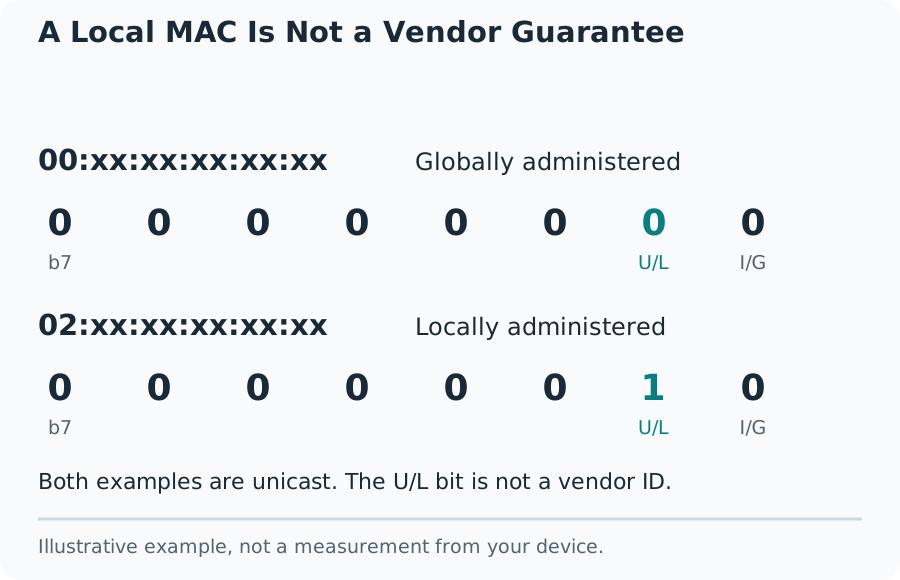
Recognize Private and Randomized Wi-Fi Addresses
Operating systems can choose private Wi-Fi MAC addresses to make long-term tracking across networks harder. A router can therefore list a value different from the one printed on a phone. A locally administered address is not inherently suspicious. Virtual machines and administrator-assigned interfaces also use local addresses legitimately.
Check the device’s settings for the network currently joined and compare that value with the router entry. Keep privacy features enabled unless a documented compatibility problem requires another approach. Changing the address policy can create a new router entry or invalidate a rule tied to the old address. Update your own inventory instead of immediately blocking an unfamiliar prefix.
Separate Local IPs from the Browser’s Public Exit
Private IPv4 ranges include 10.0.0.0/8, 172.16.0.0/12 and 192.168.0.0/16. These values are used inside networks and are not a public Internet location. The range 100.64.0.0/10 is shared address space commonly associated with provider NAT. An address being nonpublic does not tell you which appliance assigned it.
A public-IP page reports the source address of a particular web request. A VPN, browser proxy, corporate gateway or mobile network can change it. IPv4 and IPv6 requests can also use different exits. Save the address family, connection state and time. An IP registration lookup describes the network allocation and is not a verified street address or current device location.
Consider two computers behind the same home router. Each can have a different Wi-Fi MAC and a different private IP while a web service sees the same translated public IPv4 address. Connecting one computer to a VPN can change that computer’s observed web exit without changing its local Wi-Fi MAC. This illustrative case explains why searching the public IP cannot distinguish the two physical computers, and why changing a MAC is not a way to renew a public Internet identity. Compare the identifier that belongs to the task rather than expecting all address fields to move together.
DNS Lookup and DNS Leak Testing Answer Different Questions
A DNS record lookup can ask a chosen resolver for A, AAAA, MX or TXT records. It helps troubleshoot a domain’s published configuration. Selecting a public DNS API explicitly chooses a resolver for that request. Its answer does not show which resolver your browser normally uses for unrelated websites.
A leak test generates names that have not previously been queried and observes the recursive resolvers reaching an authoritative test server. The browser must trigger those names. Running the resolutions on a hosted server would describe the hosting network. A useful result reports observed resolver operators and sample completeness, rather than treating every request failure as successful protection.
Session creation and report retrieval can pass through this site’s server while the browser triggers the unique names. The external provider may therefore see the hosting server as its HTTP caller. That caller field is not your browser’s public address and must not be used to grade your VPN. This implementation presents the resolver observations separately and does not reuse the provider’s automatic VPN verdict. A report that cannot be retrieved remains unavailable, even when some resource requests have already finished.
Read Resolver Lists Without Guessing a Leak
One public DNS operator may use many outgoing addresses. Several rows can therefore be one provider pool, not several unwanted DNS services. A city or country inferred from an anycast address is especially weak evidence about the actual route. A resolver can also use infrastructure registered to another organization.
Compare the observed operator with your intended configuration. A VPN can deliberately use an external encrypted-DNS provider, and a browser can have its own secure-DNS settings. A split-DNS configuration may send different names through different routes. Repeated inconsistent observations deserve investigation, but a foreign country label or an address count alone does not establish that the VPN leaked.
WebRTC Shows Connection Candidates, Not a Complete Network Scan
WebRTC uses ICE candidates to find routes for real-time communication. Host candidates originate from interfaces; STUN can provide server-reflexive public addresses; TURN provides relay candidates. A modern browser may mask a local IP with an mDNS name ending in .local. A masked name should remain labeled as masked.
Compare public candidates with the web request’s public address and with a known baseline. A browser proxy or split tunnel can make the routes differ. A private host candidate is not a public home-IP leak. No public candidates can reflect blocked STUN, browser policy or an incomplete test, so it must not become a universal privacy pass.
Make a Repeatable Before-and-After Comparison
Use one browser profile and one network for the baseline. Record VPN state, public web IP, resolver operators, WebRTC candidate types and the test time. Change one setting, reconnect as needed, reload the page and run the same checks. Keep the test server consistent when comparing WebRTC candidates.
Repeat observations can reveal an intermittent route, but do not collect endless samples without a question. A failed provider, a content blocker or a sleeping tab can invalidate a run. Mark the sample incomplete and retry after correcting the cause. Avoid comparing an old desktop result on Wi-Fi with a new phone result on cellular and attributing every difference to one VPN setting.
Keep the Evidence Specific and Share Only What Is Needed
A useful support report says which browser and connection were tested, what behavior was expected, what values were observed and whether the run completed. Redact unrelated device inventories, account names and full addresses when they are not needed. Never share VPN credentials, router passwords or private keys to explain an address mismatch.
These checks use public lookup or test services that receive the network requests needed for their task. Review the provider notice before starting. No single page certifies all applications, every destination or future traffic. The strongest conclusion is a narrow one: this browser, on this connection, exposed these observations at this time, with the listed limits.