How to Use This Tool
- Enter the transfer rate and select its current unit.
- Choose the input unit. Results show Mbps, MB/s and MiB/s together.
- Read the converted rate and its formula.
- Use a download or upload time calculator when the question also includes a file size.
Calculation Method
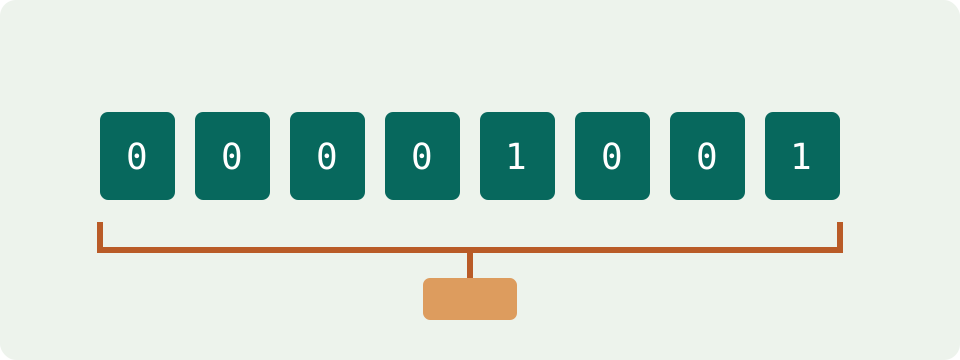
One byte contains eight bits. With decimal prefixes, MB/s = Mbps ÷ 8 and Mbps = MB/s × 8. Mbps denotes 1,000,000 bits per second; MB/s denotes 1,000,000 bytes per second. MiB/s instead uses 1,048,576 bytes per second, so its conversion requires both the bit-to-byte factor and the different prefix.
Worked Example
100 Mbps equals 12.5 MB/s, or approximately 11.92 MiB/s. In the reverse direction, a measured 25 MB/s equals 200 Mbps. The conversion changes the unit, not the amount of data moved each second.
Read the Complete Unit Before Comparing Numbers
Mbps, Mb/s and Mbit/s describe megabits per second. MB/s describes megabytes per second. The capital B changes the quantity: a byte contains eight bits. A label such as 100 Mb without a time component is a quantity of data rather than a transfer rate. Keep the whole unit when copying a value from a provider, test or application.
Choose the input unit, enter a positive rate and calculate. The results show Mbps, decimal MB/s and binary MiB/s together, so there is no separate output-unit selector. Decimal fractions work with a point in English. The form rejects a missing, nonnumeric, negative or zero rate. This tool converts an entered number; it does not start a speed test.
Compare a 100 Mbps Reference with a File-Transfer Display
Dividing 100 Mbps by eight gives 12.5 MB/s. An application showing 12 MB/s is showing the decimal equivalent of 96 Mbps. Those numbers are much closer than 100 and 12 appear at first. The conversion establishes their arithmetic relationship; it does not establish a service guarantee or show that every part of the connection is working correctly.
Read the application label carefully. A display of 12 MiB/s instead corresponds to 100.663296 Mbps because a mebibyte contains more bytes than a megabyte. When two measurements differ by a small amount, checking MB/s versus MiB/s matters. When a label is shortened or unclear, consult the application's documentation rather than assuming a convention from the operating system alone.
Decimal MB/s and Binary MiB/s
One decimal MB is one million bytes. One MiB is 1,048,576 bytes. Both rates describe bytes per second, but their multiples differ. Converting Mbps to MiB/s therefore requires both the eight-bit relationship and the binary prefix: multiply by one million, divide by eight, then divide by 1,048,576. The calculator performs that conversion directly.
One nominal gigabit per second is 1,000 Mbps, equivalent to 125 MB/s or approximately 119.2093 MiB/s. These are three expressions of the same reference rate. They do not prove that a gigabit plan, network port or file server will deliver that much file data. Keep the advertised or measured status of the original value attached to the result.
Rounding Should Come After the Calculation
A rate of 83.7 Mbps converts to 10.4625 MB/s. Showing 10.46 MB/s makes a compact comparison, but use the unrounded value for a later file-time calculation. Repeatedly rounding intermediate values can create avoidable differences, especially across several conversions. The result panel displays up to six decimal places; additional digits do not make a fluctuating input more dependable.
For checking a table, start with a simple row: 8 Mbps is exactly 1 MB/s, while 25 Mbps is 3.125 MB/s. The table below was calculated from the unit definitions. It is a conversion reference, not a list of typical speeds for Wi-Fi, fibre, mobile or particular subscription packages. No connection type is assigned a guaranteed rate.
| Rate in Mbps | Decimal MB/s | Binary MiB/s, rounded |
|---|---|---|
| 1 | 0.125 | 0.1192 |
| 8 | 1 | 0.9537 |
| 25 | 3.125 | 2.9802 |
| 100 | 12.5 | 11.9209 |
| 300 | 37.5 | 35.7628 |
| 500 | 62.5 | 59.6046 |
| 1000 | 125 | 119.2093 |
A Unit Change Does Not Explain Every Speed Difference
After matching units, a transfer can still differ from another test. The source server, path, simultaneous transfers, application limits and storage activity can affect the observations. A single percentage cannot predict those effects across all downloads. This converter deliberately applies no assumed overhead reduction and does not label a converted plan rate as a measured file-download rate.
Steam's official support describes display options for bits and bytes per second. Check that setting when comparing its download information with a speed test. Changing the display unit changes the number, not how much data arrives. No universal statement about all launchers or all versions is needed to make the comparison correctly.
Add File Size Only When Estimating Duration
At a constant file-transfer rate equivalent to 25 Mbps, 100 MB takes 32 seconds. A 100 MiB file at the same rate takes 33.554432 seconds. The larger binary quantity accounts for that difference. These examples exclude waiting, connection setup and later processing. A unit-only conversion cannot determine a duration without a size.
Use the download-time calculator for receiving files and the upload-time calculator for sending them. Choose the corresponding rate rather than using a download result for an upload. Latency, jitter and packet loss are different observations again. Converting bits to bytes measures none of them and does not improve the connection.
What the Result Means
A converted advertised rate remains an advertised rate. This tool does not measure your line, remove network overhead or guarantee a download speed. Compare measured values taken under similar conditions.
Common Questions
Do Mbps, Mb/s and Mbit/s Mean the Same Thing?
Yes. They indicate megabits per second. The capital B in MB/s indicates bytes, which changes the value by a factor of eight.
Why Is a Lower Download Rate Not Proof of a Faulty Connection?
The source server, shared bandwidth and the application can limit throughput. A unit conversion alone cannot identify the cause.