How to Use This Tool
- Enter the switch’s available PoE budget, physical PoE port count and per-port PSE limit.
- Enter device count and documented PSE watts allocated to each device.
- Choose a reserve and review allocation, remaining watts and capacity within the entered power and port limits.
Calculation Method
Usable watts equal total PoE budget multiplied by one minus reserve percentage. Allocation is device count times PSE watts per device. Capacity is the smaller of physical ports and usable watts divided by individual allocation, rounded down. It becomes zero when the per-port power limit fails.
Worked Example
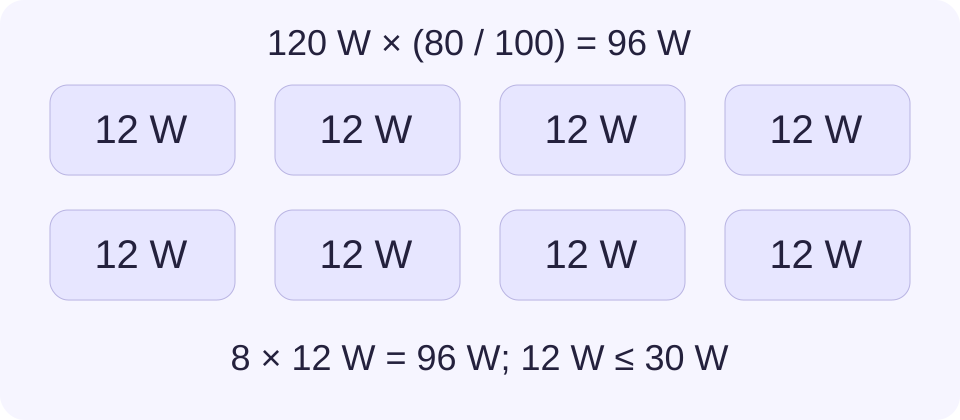
A 120 W budget with 20% reserved leaves 96 W. Six devices allocated 12 W each use 72 W, leaving 24 W. With eight PoE ports and a 30 W per-port limit, capacity is eight identical devices under the entered limits. Compatibility still needs checking.
Find the Budget for the Installed Configuration
Use the PoE output budget from the switch documentation, not the AC input rating or the power supply’s total nameplate watts. The available budget can depend on the installed supply, input conditions and redundancy settings. Confirm the configuration being planned rather than borrowing a number from another version of the same switch.
Per-port PSE limit is a different entry. A switch can have a generous total budget but a lower ceiling on one port. Conversely, a high maximum on every port does not mean all those maxima can be used simultaneously. The total and individual checks must both pass.
Use Source-Side Allocation Consistently
PSE means the equipment supplying power, usually the switch. PD means the device receiving it. Cable losses separate those points. A device’s reported draw can also be lower than the amount the switch reserves for its class. Use a documented PSE allocation or a correctly identified switch allocation reading for the device.
Do not treat a daytime camera reading as a maximum for a camera that later activates infrared lighting or a heater. Check documented operating modes and start-up needs. This calculator does not add a guessed cable-loss percentage or substitute a universal device wattage.
Reserve Watts Without Counting Them Twice
The reserve reduces the budget available to planned devices. With a 20% reserve, 80% remains usable. That is not the same calculation as adding 20% to the device total. Choose a reserve deliberately and keep its reason with the result. It is a planning allowance, not a guarantee against every transient.
Remaining usable watts may be negative when the requested allocation is too large. Reduce the device count, revise a documented allocation or use another switch budget. Do not lower an entry simply to make a warning disappear. A per-port failure cannot be corrected by increasing only the total budget.
Confirm Ports and Operating Behavior Separately
Device capacity rounds down because a fractional device cannot be connected. It uses the smaller of the entered physical port count and the capacity supported by the usable watt budget. An allocation above the per-port limit gives zero capacity. This covers one identical group, so subtract already occupied ports and allocated power before entering a remaining switch budget.
The total check includes both requested watts and requested port count. Eight devices can fail on a four-port switch even with abundant power. Separately confirm that the actual ports support the required PoE type and that the manufacturer’s cable and device requirements are met. For cameras, recording retention is another task; network power capacity does not predict storage days.
What the Result Means
This planner does not detect a switch, negotiate PoE or measure cable loss. It compares entered power and port limits for one identical device group. A pass does not prove supported IEEE type, passive-PoE voltage, cable suitability or device compatibility.
Common Questions
Can I Enter the Watts Printed on a Camera?
Only when they describe PSE allocation at the switch. Device-side PD input watts may exclude cable loss or differ from the reserved class allocation.
Why Can a Device Fail with Watts Still Available?
Its per-port requirement, supported PoE type, cabling or start-up allocation may exceed another limit. Spare aggregate watts do not settle those checks.