How to Use This Tool
- Enter an IPv4 address as four decimal octets from 0 to 255.
- Enter the CIDR prefix length from 0 to 32. Use the actual configured prefix; the first octet does not choose a modern subnet mask.
- Calculate the block and compare its mask and range with the documented network configuration. Read the separate /31 and /32 interpretation.
Calculation Method
An IPv4 address has 32 bits. The prefix keeps the leading network bits; the remaining bits produce 2^(32−prefix) addresses in the block. Ordinary subnet arithmetic reserves the first and last positions. Under RFC 3021 point-to-point use, /31 has two endpoint addresses; /32 describes one address, commonly a host route.
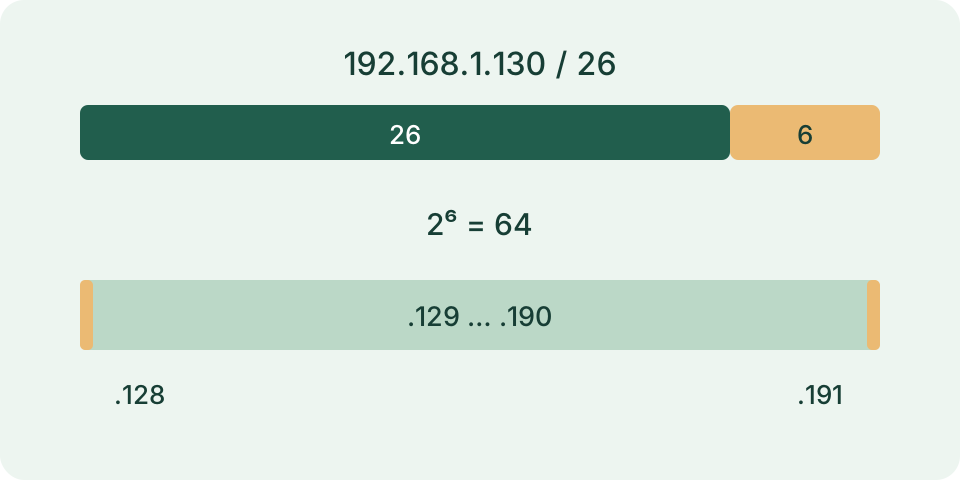
Worked Example
192.168.1.130/26 belongs to 192.168.1.128/26. Its mask is 255.255.255.192, the block ends at 192.168.1.191, and ordinary host positions run from .129 to .190: 62 positions out of 64 addresses.
Enter the Address and Prefix Separately
Use a dotted decimal IPv4 address, such as 172.20.9.173, in the address field. Put 27 in the prefix field for a /27 block. The form has two separate inputs: pasting 172.20.9.173/27 into the address field or putting a dotted mask in the prefix field is not supported. IPv6 addresses and names such as router.local are outside this calculation. Each IPv4 part must be a decimal integer from 0 to 255; ambiguous leading-zero forms are rejected.
Choose the prefix from the network configuration or the block being planned. It cannot be inferred from the address alone. The same address with /24 and /27 belongs to different-sized blocks. Savvy Toolkit calculates locally from these entries and does not discover your router mask, query other devices or test a connection. Keep the source of the prefix with the result rather than treating the default 24 as evidence about the actual network.
Understand Block Size Before Assigning Hosts
An IPv4 address contains 32 bits. A prefix of p leaves 32 − p bits for positions within the block, giving 2^(32 − p) total addresses. Increasing the prefix by one halves the block. For /27, five bits remain, so the block contains 32 addresses. This is a count of addresses, not a measured number of connected devices. A host count does not tell you how many addresses are already assigned or available through DHCP.
For ordinary prefixes through /30, the tool subtracts the network and broadcast positions to obtain the conventional usable count. It does not subtract a gateway, static reservations, a DHCP pool exclusion or provider-specific reserved addresses. Those require a separate allocation record. A subnet with 30 conventional host positions may have fewer positions available for new clients. Do not add router reservations to the formula twice when comparing a service's own usable-capacity figure.
Work Through a /27 Example
With address 172.20.9.173 and prefix 27, the relevant final-octet boundaries are multiples of 32. The address lies in the block beginning at 160 and ending at 191. Its network is therefore 172.20.9.160/27 and broadcast is 172.20.9.191. The conventional first and last host addresses are 172.20.9.161 and 172.20.9.190. There are 32 total addresses and 30 conventional usable positions. The supplied address can be inside the block; it need not already be the network boundary.
The subnet mask is 255.255.255.224. Its final octet has three leading one-bits and five zero-bits. The wildcard mask is the inverse, 0.0.0.31. A subnet mask and a wildcard express different bit choices; do not exchange them in a configuration field. The displayed wildcard is the inverse of a contiguous subnet mask, not a general-purpose generator for every possible access-control rule. The example is arithmetic, not an instruction to change a working network.
| Input | Network | Host range | Total / usable | Broadcast |
|---|---|---|---|---|
| 172.20.9.173 /27 | 172.20.9.160/27 | 172.20.9.161–172.20.9.190 | 32 / 30 | 172.20.9.191 |
| 172.20.9.172 /31 | 172.20.9.172/31 | 172.20.9.172–172.20.9.173 | 2 / 2 | ∅ |
| 172.20.9.173 /32 | 172.20.9.173/32 | 172.20.9.173 | 1 / 1 | ∅ |
Read /31 and /32 in Their Proper Context
For /31, the tool reports two addresses, two usable positions and no separate broadcast. This is the point-to-point convention described by RFC 3021. For 172.20.9.172/31, the range is 172.20.9.172 through 172.20.9.173. That result does not mean /31 should replace an ordinary shared LAN subnet. Confirm support and the actual link purpose before interpreting those two positions as assignable interfaces.
For /32, one address remains. The network result names that single address, the first and last host are identical, and no separate broadcast is displayed. This describes a single-host route rather than room for several devices. Subtracting two from either /31 or /32 would produce misleading counts, so the implementation handles them separately. It does not add IPv6 behavior to these IPv4 exceptions or verify that a route has been installed.
Compare Two Entries Using the Same Prefix
To compare membership, calculate each address with the same intended prefix and compare the network results. Two addresses inside 172.20.9.160/27 belong to the same mathematical block; an address starting in the next /27 block does not. Using different prefixes answers a different question. A matching block does not prove that traffic can pass: VLAN separation, routing, firewall policy and the actual interface configuration can still affect communication.
An address being within the usable range also does not make it free. Check existing assignments, DHCP settings and the network owner's allocation record before assigning it. This page does not scan for conflicts, select a gateway or classify a block as publicly routed. For a separate comparison of a router's WAN address with an observed public IPv4 address, use the CGNAT and double-NAT checker. That task needs different evidence from a subnet calculation.
Correct Rejected or Surprising Inputs
Remove a pasted slash suffix from the address and enter its prefix separately. Prefixes must be whole numbers from 0 through 32, not fractions or dotted masks. Check all four address parts and avoid extra labels or separators. A larger prefix yields a smaller block, so /28 is smaller than /27 despite the larger number. Reset clears the address and returns the prefix to 24; it does not change any device configuration.
Save the entered address, prefix and outputs together when documenting a plan. Keep conventional capacity separate from actual reservations and availability. The result updates from valid inputs in the form, while invalid input leaves no valid calculated layout to rely on. No successful ping, reachability test, configuration write or discovery is implied by a displayed range. Use the network's actual management tools for those checks after preserving its existing configuration.
What the Result Means
This calculator covers IPv4 only. A calculated host count does not account for reserved address space, DHCP exclusions, gateway assignments or vendor configuration. /31 endpoint use requires appropriate point-to-point support; it is not a universal two-host LAN recommendation. No address is contacted or assigned.
Common Questions
Is a /31 Always an Ordinary LAN Subnet?
No. The two-host interpretation follows RFC 3021 for supported point-to-point links.
Does the Host Range Reveal Unused Addresses?
No. It shows numerical positions. Allocation and live device information must come from the actual network configuration.