How to Use This Tool
- Start the test and wait for the visual cue.
- Respond only after the cue appears.
- Read the valid trials and repeat using the same input device.
Calculation Method
The recorded interval runs from the software's cue timing to the accepted response event. It includes parts of the display, browser and input path. The browser does not know the exact moment light reached the eye or the exact instant the switch physically closed.
Worked Example
A precise clock cannot remove those delays. At 60 Hz, one nominal display interval is 16.67 ms; at 144 Hz it is about 6.94 ms. Those intervals describe refresh opportunities, not a fixed correction to subtract from the score. Panel processing, event scheduling and the phase of an individual response can differ.
Measure the Same Cue and Response
Wait for the visual cue, then activate the test area using the indicated input. Responding before the cue is a false start, not an exceptionally fast result. Random waiting periods make anticipation less useful, but they cannot turn a browser task into a laboratory assessment.
Keep the same input method across a set of trials. A mouse press, a touchscreen tap and a keyboard event pass through different hardware and operating-system paths. Comparing them without noting the device can make a setup change look like a personal improvement.
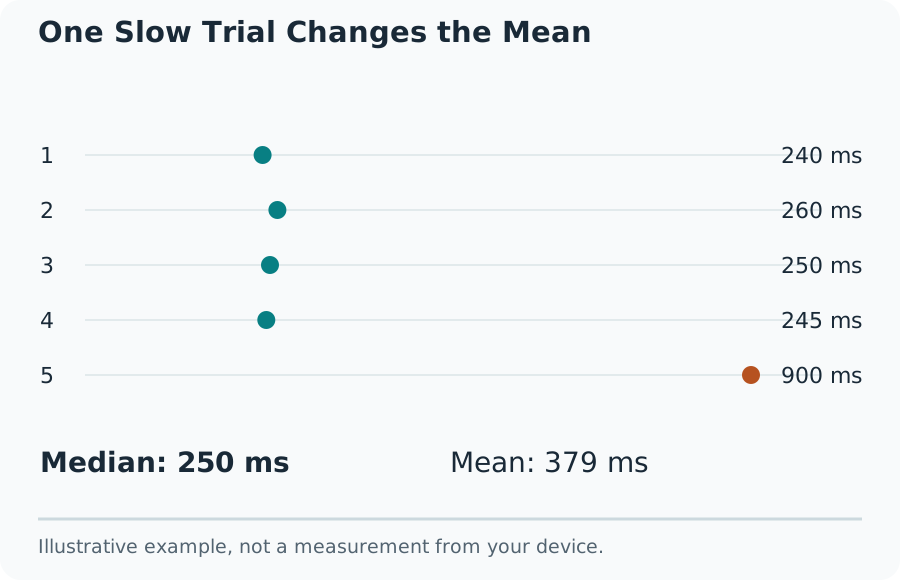
One Slow Trial Changes the Mean
Use Several Valid Trials
Read the individual trials as well as the summary. For illustrative responses of 210, 230, 240, 260 and 400 ms, the median is 240 ms and the arithmetic mean is 268 ms. One slow response moves the mean more than the median. The fastest value alone is a weak description of the full session.
An early input should be handled as a false start rather than stored as zero. A switch to another tab, an interrupted session or a change of device calls for a new comparable run. A single unusual result does not establish a change in attention, health or hardware performance.
Make Comparisons Useful
Use a comfortable position, a stable browser window and the same monitor. Close work that noticeably interrupts the page. Record the device and browser alongside the score. Repeat on another day only under similar conditions and compare the full group of results, not a selected personal best.
What the Result Means
There are no population percentiles or medical classifications in this tool. It cannot isolate monitor input lag, diagnose a condition or certify readiness to drive. The refresh-rate test offers browser animation context, while the aim trainer adds pointer movement and target acquisition as a different task.
Common Questions
Does an Early Press Count as a Fast Trial?
No. A press before the GO cue is a false start. Start that trial again and wait for the cue; only valid responses enter the five-trial summary.
Why Is My Result Different on Another Website?
The signal, input event, browser, display and scoring method can differ. Compare repeated trials under the same conditions rather than treating scores from different tests as interchangeable.