How to Use This Tool
- Enter the visible screen diagonal and aspect ratio.
- Measure eye-to-screen distance in centimetres and enter it in the distance field.
- Read horizontal and vertical angles; apply only a documented matching setting.
Calculation Method
For diagonal D and aspect ratio a:b, width = D × a ÷ √(a² + b²) and height = D × b ÷ √(a² + b²). Convert the diagonal and viewing distance to the same length unit before using them together. One inch is exactly 2.54 cm.
Worked Example
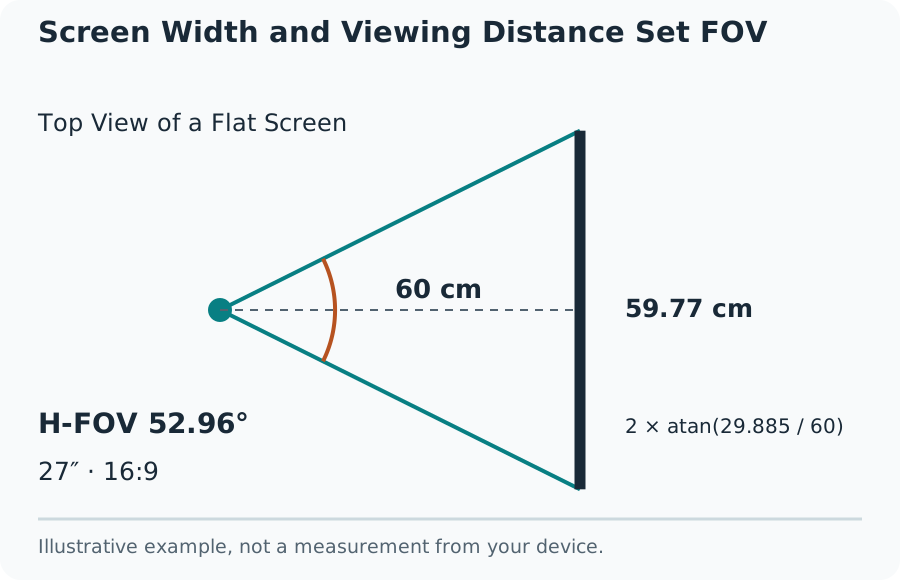
Horizontal FOV = 2 × arctan(width ÷ (2 × distance)). Use height instead of width for vertical FOV. Angles reported in degrees require converting the trigonometric result from radians. A 27-inch, 16:9 flat display has a width near 59.773 cm and a height near 33.622 cm. At 60 cm viewing distance, it occupies about 52.956° horizontally and 31.304° vertically.
Match the Calculation to a Flat Monitor
Use this FOV calculator for a single flat screen viewed from a centered position. Enter the visible screen diagonal, its width-to-height ratio and the distance from your eyes to the screen plane. A marketed 27-inch monitor normally describes the diagonal; it is not 27 inches wide.
The result is the physical angle occupied by the screen. It provides a geometry reference for compatible simulation or game settings, not a universally ideal field of view. A competitive game's wider view can be a deliberate preference rather than an incorrect measurement.
Screen Width and Viewing Distance Set FOV
Horizontal and Vertical FOV Are Different Settings
For a rectilinear view with aspect ratio r, horizontal FOV = 2 × arctan(tan(vertical FOV ÷ 2) × r). At 16:9, a 90° horizontal view corresponds to about 58.716° vertical. Entering 90 in a vertical setting would produce a substantially wider view.
Check the game's documentation or setting description for the axis and any reference aspect ratio. Some sliders are unitless or use a fixed reference format. The same number cannot safely be copied into every title. This tool does not assign undocumented game-specific slider values.
Measure and Recheck the Setup
Measure eye distance in your normal seated position rather than from the keyboard or desk edge. Exclude the bezel from visible screen size. Repeat the measurement after moving the monitor or changing the seat. Resolution and operating-system text scaling do not change the physical angle when size and distance stay fixed.
What the Result Means
Curved displays, angled triple screens, head tracking and virtual-reality headsets need different geometry or calibration. Do not apply a single flat-screen result to them by multiplying by screen count. The screen-size and PPI tools can help separate physical dimensions from pixel density.
Common Questions
Is 90° Horizontal the Same as 90° Vertical FOV?
No. At a 16:9 aspect ratio, 90° horizontal converts to about 58.716° vertical. Read the game’s documented axis before copying an angle into its settings.
Does Changing Resolution Change the Geometric FOV?
Not when active screen size, aspect ratio and viewing distance stay the same. Pixel count changes density and detail. A change in aspect ratio or the game’s scaling convention can change the corresponding setting.