How to Use This Tool
- Enter the source DPI, sensitivity and yaw.
- Enter the target DPI and target yaw in the editable fields.
- Compare the physical rotation distance, then verify a turn in the game.
Calculation Method
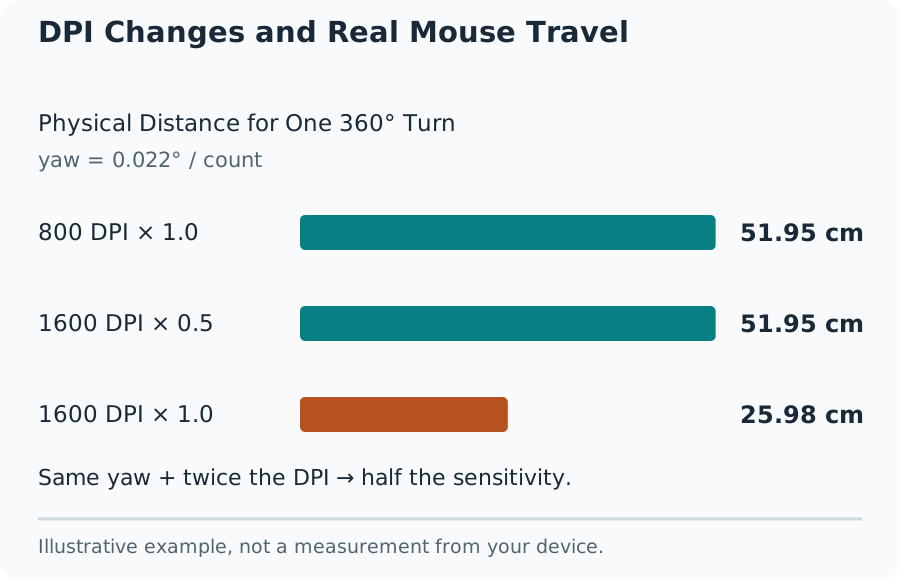
The calculation is target sensitivity = source sensitivity × source DPI × source yaw ÷ target DPI ÷ target yaw. With unchanged game settings and yaw, doubling DPI requires halving sensitivity to preserve rotation distance. Zero, negative values and missing inputs cannot produce a useful result.
Worked Example
For a worked example, use source sensitivity 1.25, source DPI 800 and source yaw 0.022°. With target DPI 800 and target yaw 0.07°, the result is approximately 0.392857. Both configurations represent 41.5636 cm per complete turn. These are explicit example coefficients, not a claim that every mode in a named game uses them.
What This Sensitivity Conversion Preserves
A matching cm/360 value means the same physical mouse travel produces one complete horizontal turn under the stated yaw model. It does not make two games look or feel identical. Field of view, zoom, acceleration, camera effects and input processing can change the experience even when the rotation calculation matches.
Use the DPI set in the mouse software, the current in-game sensitivity and the yaw values for both games. Yaw means degrees of camera rotation per mouse count at sensitivity 1. The prefilled coefficient is editable and is a reference assumption, not a measurement of your mouse or an official promise about every game update. A custom yaw needs a trustworthy source or a physical measurement.
DPI Changes and Real Mouse Travel
Why eDPI Is Not a Cross-Game Unit
Effective DPI is DPI multiplied by the sensitivity setting. The example starts at 1,000 eDPI and ends near 314.286 eDPI. Those different numbers can describe the same rotation distance because the yaw differs. Compare eDPI inside the same game's sensitivity model; use cm/360 when comparing compatible rotation models.
Check One Turn in the Game
Mark a starting point on the mouse mat and face an identifiable feature in a practice area. Move the mouse slowly in a straight line until the view completes one turn. Measure the travel without lifting the mouse. Repeat in the other direction and average consistent readings. A short mat can require a smaller measured turn and careful scaling.
What the Result Means
A large mismatch calls for checking the active DPI stage, acceleration, raw-input settings, yaw and any scoped multiplier. Do not compensate for a wrong unit by guessing a new sensitivity. This converter does not calculate weapon-specific ADS matching, controller response curves or the best sensitivity for a player.
Common Questions
Does Doubling DPI Always Mean Halving Sensitivity?
Only when the game’s yaw model and other input settings stay unchanged. The converter also accounts for different source and target yaw values. Check cm/360 with a ruler after applying the result.
Why Does Scoped Aiming Still Feel Different?
A scoped view can use another field of view or sensitivity multiplier. This calculation preserves the stated horizontal rotation distance; it does not calculate weapon-specific ADS matching.